


Technical description 1.1.16 PAYE tax return per employee
This document is a technical description of the PAYE tax return per employee. It contains information on how to prepare a data file with one or more PAYE tax returns per employee, including a description of how to upload and file PAYE tax returns to the Swedish Tax Agency.
Technical description version 1.1.16 – PAYE tax returns per employee
Changes in version 1.1.16
The Riksdag has approved the proposal that the rules regarding compensation for high sick pay costs will cease to apply from July 1st 2024. This means that sick pay cost incurred during the month should no longer be reported in the PAYE tax return from accounting period July 2024 and thus the field FK499 – Sick cost including employer's contribution – will be removed from the PAYEs main statement from accounting period July 2024.
Transition period: During a transition period, it will be possible to upload files containing a main statement with field FK499 for accounting period July to December 2024 in the e-service and via API. The data from the file will be saved in the e-service, but from accounting period July 2024 it will not be possible to sign and submit the PAYE tax return as long as there is a value greater than zero in field FK499. This means that it will be possible to upload files containing value greater than zero in field FK499 in the main statement (for accounting periods July to December 2024), but the value in field FK499 has to be manually removed in the e-service for the PAYE tax return to be able to be signed and submitted. If you upload a file with value zero in field FK499 (for accounting periods July to December 2024), the zero will be automatically removed from the main statement when the PAYE tax return is submitted.
In the beginning of 2025 the possibility to include value in field FK499 in the main statement for accounting periods July to December 2024 will cease. This means that, if you for example correct accounting periods July to December 2024 in 2025, FK499 must not be included in any main statement for these accounting periods in the amended file.
From accounting period 202501 you can only receive Growth support (reduced employer contributions for your company’s first employee) for one payee, since the time period for receiving the reduction for two payees (employment that began during the period 1 July 2021 to 31 December 2022) ends with accounting period 202412. Due to this it will only be allowed to include field FK062, Tax reduction first employee, on individual statements for one payee from accounting period 202501.
Changes in the appendices
- Period to has been added for field FK499, Sick cost including employer's contribution. See appendix Field List
- One new processing control, ba_057, has been added to prevent reporting of field FK499, Sick cost including employer's contribution, from accounting period 202407. See appendix Controls
- Connection control B_013 is adjusted to only allow one payee with field FK062, Tax reduction first employee, marked from accounting period 202501. See appendix Controls
Changes in the appendices are listed in the Revision history tab in each appendix, and the text is marked red in the actual appendix.
1. About the technical description
This document is a technical description of the PAYE tax return per employee. It contains information on how to prepare a data file with one or more PAYE tax returns per employee, including a description of how to upload and file PAYE tax returns to the Swedish Tax Agency.
The technical description is intended primarily for software companies and information providers with their own systems for generating PAYE tax return files.
2. PAYE tax returns per employee
Salary payments, benefits, other forms of earned income, and tax deductions, should be reported per employee in the PAYE tax return. Other details about the payee should also be reported in the PAYE tax return. This is because the individual statements often form a basis for the payee’s income tax return, in addition to being a specification to the PAYE tax return. Income statements should not be reported for incomes and tax deductions that have been reported per employee in PAYE tax return.
Pensions paid from insurers or institutions for occupational retirement provision, interest paid and dividends paid, should all be reported with the total amounts for all payees i the PAYE tax return. The details should be specified per payee in the income statment, which in turn only needs to be filed once a year.
A PAYE tax return contains reports per employer (main statements) as well as reports per employee (individual statements).
3. Filing
3.1 Dates for filing PAYE tax returns
PAYE tax returns per employee should be filed monthly by the registered employer, typically on the 12th in the month following the salary payment. The web site skatteverket.se contains information on exact dates for filing PAYE tax returns. Filing can be done either electronically or on paper.
3.2 Elektronic filing
PAYE tax returns per employee can be filed electronically via the e-service Arbetsgivardeklaration (PAYE tax return), which is found under Mina sidor at the Swedish Tax Agency’s web site, www.skatteverket.se. Accessing Mina sidor at the e-service requires a Swedish e-ID. There are different features that are available as well, depending on the level of authorisation. For more information, see chapter 5.
It is possible to file the tax return either by uploading a data file or registering the data directly in the e-service, or by using the application programming interface, API, provided by the Swedish Tax Agency.
An authorised representative must always sign the PAYE tax return in the e-service before it can be submitted electronically. Someone other than the authorised representative can prepare the PAYE tax return by uploading a data file or by registering the data directly in the e-service. Data that are uploaded or reported without being filed, can be stored in a defined area in a database provided by the Swedish Tax Agency. Data that have been saved in the defined area cannot be accessed by the Swedish Tax Agency until the PAYE tax return has been signed and filed.
Corrections and requests for review are submitted in the same way as when the tax return was filed. For more information, see chapter 8.
3.2.1 Uploading files in the e-service
Data files can be uploaded in the e-service Arbetsgivardeklaration. An authorised representative can then sign and file the data directly to the Swedish Tax Agency, provided that the data file being uploaded contains all the data, without errors, required for the PAYE tax return. Or, the authorised representative can choose to save the data in the e-service in order to complete and file the return at a later time.
Before the PAYE tax return is filed, it is possible to upload several files that contain data for the PAYE tax return. For example, it is possible to upload one file with the main statement, and one or more files with individual statements. The files do not have to be uploaded at the same time.
The e-service provides help for calculating employer’s contributions and a summary of tax deducted, making the PAYE tax return complete. This is helpful if the uploaded file contains only individual statements.
3.2.2 Registration in the e-service
The e-service Arbetsgivardeklaration contains forms with input support, facilitating the reporting of PAYE tax return. An authorised representative can then sign and file the PAYE tax return directly to the Swedish Tax Agency, provided that the tax return does not contains any errors. It is possible to save the data in the e-service instead of filing it directly.
It is also possible to change or delete data that have been saved previously in the e-service, regardless of whether you saved the data by registrering them, or by uploading a file. For example, if the data have been saved in an uploaded file, one or more statements can be modified in the file. For more information about corrections and deletion, see chapter 8.
3.2.3 Registering data using the Tax Agency API
All information on how to register data using the API provided by the Swedish Tax Agency can be found in the agency’s developer portal, Utvecklarportalen.
4. Preparing the PAYE tax return before filing
4.1 Critical data
It is most important that the individual statements contain the correct identity and amount. This is because the data will be used as input for the payee’s income taxation. And income earners will be credited tax deducted based on what has been reported in the individual statements.
4.2 Informing the payee
When individual statements are submitted to the Swedish Tax Agency, the corresponding information should also be sent to the individual to whom the information applies. However, there is no obligation under the taxation legislation to submit aggregated annual information to the individual to whom the information apply.
4.3 Benefit fields
When an employee (payee) has received a benefit (car fuel benefits excluded, see below) and paid for it through a net payroll deduction, the benefit value should be reduced by the net payroll deduction. Even if the employee has paid the whole benefit using a net payroll deduction so that the value is zero (0), the value should still be reported. If, for instance, an employee has received a car benefit to a value of SEK 3,000 and a net payroll deduction of SEK 3,000, the car benefit field (SkatteplBilformanUlagAG, FK013) should be set to 0 and be included in the file.
4.3.1 Car fuel benefit
Car fuel benefit, DrivmVidBilformanUlagAG, FK018, is valued at market value multiplied by 1.2 and the calculated value should be specified in the individual statement. Even if the employee has paid for the car fuel benefit through a net payroll deduction, the whole calculated benefit value should be reported in the FK018 field. The net payroll deduction should instead be reported in field Paid for fuel with car benefit, BetForDrivmVidBilformanUlagAG, FK098.
4.4 Remunerations excluded from employer's contributions and tax deductions
Remunerations that do not form a basis for employer’s contributions or tax deductions per employee, can be included in the PAYE tax return instead of being reported in an annual income statement.
One example is when the aggregated value of cash remuneration and benefits combined do not reach SEK 1,000 per year and payee. Another example is remunerations smaller than half a price base amount paid by a sports club to an athlete. If the remuneration is reported in a PAYE tax return per employee, it should not be reported in the income statement. If reported in the PAYE tax return, the remunerations should be registered in fields intended for remunerations that do not form the basis for the employer’s contributions and tax deductions, for example KontantErsattningEjUlagSA (FK131), SkatteplOvrigaFormanerEjUlagSA (FK132), and SkatteplBilformanEjUlagSA (FK133). If no tax deduction is made in these situations, a zero (0) should be entered in the field for deducted tax, AvdrPrelSkatt (FK001).
If the nontaxable remuneration has been reported per employee, it may later turn out that the maximum amount for nontaxable remunerations is reached during the course of the year. Then the employer’s contributions should be paid from the first Swedish crown, and previous reporting must be adjusted. There are two options for adjusting the reporting. To provide a solution where all reporting is made in the current accounting period, a new field has been added for adjusting reporting previously done, see option 1 below. Please note that it is not possible to combine options 1 and 2.
Option 1, adjusting the current accounting period
The total taxable remuneration so far should be reported as basis for employer’s contributions, in the field KontantErsattningUlagAG (FK011) or in another taxable field.
Amounts previously reported as nontaxable remuneration should be reported in the new field Settlement from nontaxable remuneration, AvrakningAvgiftsfriErs (FK010).
Field | Accounting | Accounting | Accounting |
|---|---|---|---|
Amount paid | 100 SEK | 100 SEK | 1000 SEK |
KontantErsattningEjUlagSA (FK131) | 100 SEK | 100 SEK | - |
KontantErsattningUlagAG (FK011) | - | - | 1200 SEK |
AvrakningAvgiftsfriErs (FK010) | - | - | 200 SEK |
Option 2, adjusting previous accounting periods
Corrections to a submitted PAYE tax return must be done by reducing the previously reported nontaxable remuneration to zero for the respective period. The total taxable remuneration should then be reported as basis for the employer’s contributions in the accounting period during which the maximum amount is reached.
4.5 Posting
Sweden has signed several social insurance agreements with foreign countries and territories. The agreements signed with Canada, the U.S.A., India, South Korea, Quebec, and the Philippines, differ from the agreements signed with other countries as they only govern parts of the social insurance benefits. If an employer sends an employee to or from any of these countries, it should be reported in the field SocialforsakringskonventionMed (FK305). Appendix Internal codes contains the Social insurance conventions tab with the codes for each country.
5. Authorisations
This chapter describes in which situations special authorisation is required to use the test service Testa arbetsgivardeklaration and the e-service Arbetsgivardeklaration. When a special authorisation is required, an authorised signatory or managing director can apply for the authorisation, either via the e-service Ombud och behörigheter (Representatives and authorisations), or by filling out a form on paper. The following authorisation levels are available:
- Representative with reading access
- Representative with registration access
- Tax return representative
5.1 The test service
The e-service Testa arbetsgivardeklaration does not require a login. This means you do not have to have a registered authority nor a Swedish e-ID in order to test a file.
5.2 Uploading files
Uploading and saving a file in the e-service Arbetsgivardeklaration requires a Swedish e-ID, but it does nor require a registered authority with the Swedish Tax Agency.
5.3 Representative with read access
Being authorised as a representative with reading access enables you to view the PAYE tax returns that have been filed to the Tax Agency. However, it does not enable you to view data that have been saved in the e-service but not filed. Neither does it enable you to edit data or sign and file PAYE tax returns to the Swedish Tax Agency.
5.4 Representative with registration access to PAYE tax returns
Representative with registration access is a new level of authority. An authorised signatory or managing director can apply for the authorisation either via the e-service Ombud och behörigheter, or by filling a form on paper.
Being authorised as a representative with registration access enables you to upload files and save data in the e-service, as well as register and edit data. However, it does not enable you to sign and file PAYE tax returns to the Swedish Tax Agency.
5.5 Tax return representative
Anyone who is a tax return representative for an individual or a company, is authorised to file tax returns, for instance PAYE tax returns, for an individual or a company that is registered as employer. A tax return representative have the same authorities as an authorised signatory (see below).
It is possible to limit the authority of a tax return representative so that the representative does not have access to the individual statements in the PAYE tax return, but still can file the PAYE tax return.
5.6 Authorised representative
The individual, an authorised signatory, or an authorised representative have full access. Apart from uploading data files and saving data in the e-service, they may
- read, register and edit data in the e-service,
- read data that have been filed to the Swedish Tax Agency, and
- file PAYE tax returns to the Swedish Tax Agency.
6. Review results, reports and receipts
Data that have been uploaded or reported directly in the e-service, are reviewed per each registered employer and accounting period. The data are reviewed in the test service as well as in the e-service, and the reviews may result in two types of errors:
- Rejection errors
Data containing rejection errors, such as schema validation errors, will not be accepted. Files containing rejections errors cannot be uploaded and the data cannot be saved in the e-service. - Stopping errors
Data containing stopping errors, such as conflicting or missing data, can be saved in the e-service. However, the errors must be corrected before the PAYE tax return can be filed.
Furthermore, data will be subject to reasonability checks if, for instance, one or more amounts are found to be unreasonably high. It does not necessarily mean that the data are incorrect, but they need to be checked before filing the PAYE tax returns. In such cases it is possible to file the PAYE tax return without changing the data.
For more information about reviews, see section 11.6 and appendix Controls.
6.1 Test PAYE tax return
The test service Testa arbetsgivardeklaration provided by the Swedish Tax Agency allows you to check that your file has been prepared in accordance with the instructions in this document. It is only the file content that is reviewed. If you test a file that contains only individual statements, it is not possible to perform connection controls between forms that require that the file contains both main statements and individual statements.
When you test a file you will receive a report with the test result. The report contains information on whether the file has been approved or if it contains any errors, and if so what types of errors. You can save and print the report. If the file has an incorrect format, or if it is too large, you will receive an error message.
6.2 Electronic filing
The e-service Arbetsgivardeklaration allows you to upload data files, register data, and sign and file PAYE tax returns. The e-service also compares the file against certain data with the Tax Agency, for instance whether those registered as employer in the file are registered as employer for the period(s) that the data refer to. If the data contains errors, you will receive a report detailing the errors. The level of detail depends on your authority level. You can save the data in the e-service before filing the PAYE tax return. This allows you to make changes to the data at a later time. For more information, see chapter 3.
When you have signed and filed a PAYE tax return to the Swedish Tax Agency, you will receive an electronic receipt, confirming that the tax agency has received the PAYE tax return.
7. File contents
A PAYE tax return consists of a main statement, i.e. employer level information such as contribution and withholding taxes, and an individual statement, i.e. payee level information. All sums should be reported in whole numbers. For more information see the Swedish Tax Agency document Arbetsgivardeklaration på individnivå – avrundning av redovisat belopp och vid beräkning av arbetsgivaravgifter, no. 131 238881-17/111, of June 8, 2017 (available in Swedish only).
A file that will be uploaded to the e-service, may contain data on either employer level or individual level, or both. For example, the file may contain only main statements, or only individual statements, or one main statement and multiple individual statements that will be completed at a later time.
7.1 Mandatory fields
The PAYE tax return consists of multiple data fields, some of which are required for filing the tax return. For more information, see appendix XML document structure.
7.1.1 Field RedovisningsPeriod
For all main and individual statements, the accounting period must be entered in the field RedovisningsPeriod (FK006).
7.1.2 Field AgRegistreradId
For all main and individual statements, the personal identity number, the co-ordination number, or the corporate identity number of the registered employer, must be entered in the field AgRegistreradId (FK201).
7.1.3 Field Specifikationsnummer
For all individual statements, the specification number must be entered in the field Specifikationsnummer (FK570), even if only one individual statement is filed per payee. Multiple individual statements with the same specification number for the same payee, accounting period, and registered employer, are not allowed.
When corrections and removal are made to the individual statements, the new individual statement has to have the same specification number as the original statement, otherwise the change will be registered as a new individual statement for the payee. If you file individual statements with the same specification number for one payee, accounting period, and employer, the newly filed statement will replace the originally filed statement with the same identifiers, if such a statement exists. For more information about corrections and removal, see chapter 8.
7.2 Main statement
The main statement of the PAYE tax return should contain employer level information, such as the amount of the employer’s contributions and special payroll tax on income, as well as tax deductions made. In the main statement, the basis and special payroll tax on incomes from transfer to a profit sharing trust should be reported, as well as basis and deductions on regional aid and research and development.
For more information on how the Swedish Tax Agency calculate the sum of employer’s contributions and special payroll tax on income and total tax deducted, see section 11.7, appendix Summary and calculation rules, and the Swedish Tax Agency document Arbetsgivardeklaration på individnivå – avrundning av redovisat belopp och vid beräkning av arbetsgivaravgifter, no. 131 238881-17/111 of June 8, 2017 (available in Swedish only).
Pensions paid from insurers or institutions for occupational retirement provision should be reported in the annual income statements. The total basis for tax deductions and the total of tax deducted for all payees should be reported in the main statement of the PAYE tax return. Reports per payee should not be made in the PAYE tax return. The same applies to the basis for tax deductions and deducted tax on interests and dividends.
The main statement should also contain information on sick cost, including employer’s contributions for accounting periods to 202406. It should also be report in the main statement if the employer enterprise lacks a permanent establishment in Sweden.
7.3 Individual statement
The individual statement in the PAYE tax return should contain information about each payee. Salaries, benefits and other remunerations, as well as tax deductions, should be reported in the statement.
Certain data that are of no consequence for the calculation of the employer’s contribution should still be reported in the individual statement. This applies, for example, to payments of expenses and information about seafarer’s income, as they form the basis for the payee’s income taxation.
7.3.1 Identity
Before you can upload an individual statements file, you have to register the identity of the payee by filling out one of the fields BetalningsmottagarId (FK215), Fodelsetid (FK222) or AnnatId (FK224). If these fields are empty, you will not be able to upload or submit the file to the Swedish Tax Agency.
The field BetalningsmottagarId (FK215) should contain the employee’s personal identity number or co-ordination number, or the corporate identity number of the corporation.
If a person with a coordination number receives a personal identity number, or if they change their existing personal identity number, during an accounting period, reporting should be done using the new number only, regardless of when during the period the new identity number was assigned. The identity number does not have to be altered for statements that have already been filed.
If the individual statement applies to an individual who does not have a personal identity number or a co-ordination number, the following fields must be filled in:
- Fodelsetid (FK222)
- Fornamn (FK216)
- Efternamn (FK217)
- Address
- Gatuadress (FK218), Postnummer (FK219) and Postort (FK220) or
- FriAdress (FK230) and LandskodPostort (FK221)
- Fodelseort (FK077), LandskodFodelseort (FK078) and LandskodMedborgare (FK081)
The employee’s date of birth must be entered in the field Fodelsetid (FK222). The format should be YYYYMMDDnnn, where nnn can be any numbers. For example, a person born on June 4, 1989 who lacks a personal identity number or a co-ordination number, the field Fodelsetid could read 19890604001. The three numbers at the end can be used to separate individuals who lacks a personal identity number or a co-ordination number, but who were born on the same date.
The same information used in the field Fodelsetid (FK222) should be applied for all individual statements that the employer reports for one individual, who lacks a personal identity number or a co-ordination number. A new personal identity number or coordination number should be used as soon as it has been assigned. The new number should always be used for the entire accounting period during which it has been assigned. The identity number does not have to be altered for statements that have already been filed.
Should the employee’s address have a format that does not comply with the structure Gata (street), Postnummer (postal code) and Postort (city), the field FriAdress (FK230) can be used. If the field FriAdress (FK230) is used, the field LandskodPostort (FK221) must also be filled in. The fields Gatuadress (FK218), Postnummer (FK219), Postort (FK220) can be entered with FriAdress (FK230).
If the employee’s date of birth is unknown, the field AnnatId (FK224) should be used together with the name and address fields as described above. If AnnatId is used for more than one person in an accounting period for a registered employer, then each person must have a unique AnnatId.
If an individual statement is submitted for a foreign enterprise with neither a Swedish corporate identity number nor a registration number, the field AnnatId (FK224) should be filled in instead of the field Fodelsetid (FK222). It is recommended that you enter the foreign corporate identity number of the enterprise.
If the field AnnatId (FK224) is filled in for an enterprise, the following fields must also be entered:
- OrgNamn (FK226)
- Gatuadress (FK218), Postnummer (FK219) and Postort (FK220) or
- FriAdress (FK230) and LandskodPostort (FK221)
Field Foreign tax identification number (TIN) (FK252) should always be filled in if the payee has such a number.
If the payee has a foreign address, this address should be filled in the following fields in the individual statement:
- Fornamn (FK216), natural person
- Efternamn (FK217), natural person
- OrgNamn (FK226), non-natural person
- Gatuadress (FK218), Postnummer (FK219) and Postort (FK220) or
FriAdress (FK230) and LandskodPostort (FK221)
7.3.2 Tax fields
The individual statements contain seven tax fields. To be able to file a PAYE tax return, exactly one (1) field must be filled out for each individual statements, not more, and not less. These are the tax fields:
- AvdrPrelSkatt (FK001)
- AvdrSkattSINK (FK274)
- AvdrSkattASINK (FK275)
- SkattebefrEnlAvtal (FK114)
- EjskatteavdragEjbeskattningSv (FK276)
- Lokalanstalld (FK253)
- AmbassadanstISvMAvtal (FK094)
For a description of each field, see appendix Field list. Which tax field is to be used depends on whether tax has been deducted or not and, if so, which type of tax, or the reason why no tax deduction has been made. For each individual statement, one (1) of the seven tax fields above must be filled out with either an amount or a check mark. If an amount field will be used but no tax deduction has been made, zero (0) should be entered in the filed.
If a payee has received incomes under different rules for tax deduction for the same accounting period, one individual statement per tax field should be reported. For instance, this could be the case for incomes where tax deductions have been made for parts of the accounting period, while the remaining part is subject to a decision not to make any tax deductions. To avoid a situation where individual statements replace each other, it is important that the statements have different specification numbers.
7.4 Contact details for information providers
In the file section “Blankettgemensamt” you can enter information about the contact person for the registered employer(s) contained in the file. Large enterprises often appoint different contact persons for different sectors of the enterprise, so you can enter contact details for several persons for each registered employer. You can also specify an area of expertise for each contact person.
Although “Blankettgemensamt” is a mandatory part of a file that is uploaded to the e-service, it does not have to contain any contact information. But if the file does contain information about contact persons for one or more employers, the file has to contain main statement or individual statement for all employers for which contact details have been registered. If the file does not contain the required information, you will receive an error message when trying to upload the file.
You can save contact details in the e-service either by uploading a file with the contact details, or by registering the contact details directly in the e-service. In the e-service you can add and save one or several new contact details, as well as change or remove previously saved contact details. Contact details that have been saved in the e-service can be reused in later accounting periods.
8. Corrections and removal
If you need to correct or remove data, you should do it as soon as possible. You can make changes on either employer level or individual level, or both, depending on the type of change. For example, if an error is discovered in the basis and deductions for regional aid, you only have to make the changes on the employer level. For more information about corrections, see the Swedish Tax Agency document Arbetsgivardeklaration på individnivå - rättelser, no 131 235562-17/111 of June 8, 2017 (available in Swedish only).
If a correction or removal results in changes in the total sum of taxes and employer’s contributions payable, the Swedish Tax Agency will make an amended tax assessment.
8.1 Correction of an individual statement
If you have to correct an individual statement, you simply upload a file with the correct individual statement and submit a new PAYE tax return to the Swedish Tax Agency. It is important that corrections of individual statements are made as soon as possible since the individual statements are also used by other authorities, and thus may affect the individual's right to certain benefits even during the income year.
It is important that the following fields contain the same information in new corrected individual statement as the old and incorrect individual statement: Specifikationsnummer (FK570), RedovisningsPeriod (FK006) and BetalningsmottagarId (FK215)/Fodelsetid (FK222)/AnnatId (FK224). The new individual statement will then replace the original statement, which means that you do not have to submit any removal statement.
If you have filed an individual statement for the wrong individual, you have to remove the incorrect individual statement, see section 8.2, and file a new individual statement with the correct information in the fields BetalningsmottagarId (FK215)/Fodelsetid (FK222)/AnnatId (FK224).
8.2 Removal of a submitted individual statement
If you want to remove an individual statement that you have already submitted, without replacing it with a new statement for the same period, you have to submit a removal statement. In the removal statement you should only fill in the following fields:
- Borttag (FK205) (eng. removal)
- AgRegistreradId (FK201)
- RedovisningsPeriod (FK006)
- Specifikationsnummer (FK570)
- BetalningsmottagarId (FK215)/Fodelsetid (FK222)/AnnatId (FK224)
N.B. Except for Borttag (FK205), these fields must contain the same information as the fields in the individual statement that you previously submitted and which you will now remove. If you wish to remove all details from a file that has been uploaded to the e-service and saved as a draft but not yet submitted to the Tax Authority, you can do it directly in the e-service.
9. Technical requirements and testing of XML files
This chapter describes the content, layout and structure of approved XML files with PAYE tax returns per employee. The following terms are used:
- XML = eXtensible Markup Language. A standard for structured, text based representation of information.
- XML Schema (schema) = A set of rules describing valid syntax and grammar in an XML document. A schema file has extension .xsd.
- Encoding, UTF-8 = Character encoding is a way of representing a specific set of characters being used for technically saving or transferring text. UTF-8 is a standard enabling computers to interpret and handle text written with any known character set.
9.1 Validation against an XML Schema
XML files are validated against an XML schema available in the schema layer provided by the Swedish Tax Agency. The file structure of the schema is based on the following structure (where 9.9 represents the current schema version):
When the schema validation is completed, the XML file is checked against the rules of operation stated in appendix Controls.
9.2 Maximum file sizes
These are the maximum file sizes:
- Test service – 100 MB
- File transfer service – 500 MB
- Open API – 300 MB
A file that does not exceed the maximum file size may still result in a failure in uploading or testing if the file contains a large number of PAYE tax returns. For this reason, both the test service and the e-service Arbetsgivardeklaration accept only files containing a maximum of 1,000 individual PAYE tax returns, with respect to Employer and period. Attempts to upload files containing more than 1,000 PAYE tax returns will result in error messages.
Files that contain more than 1,000 individual PAYE tax returns and/or exceed the maximum file sizes, can be divided. This enables you to test or transfer your statements even if the total volume exceeds the maximum file size for individual files. The file size limit applies only when you upload files to the e-service Arbetsgivardeklaration, and not when signing and filing PAYE tax returns.
9.3 File format
Files have to comply with the following requirements:
- The file format should be XML.
- Character encoding should be UTF-8 (i.e. eight character Unicode transformation format), with or without byte order mark (BOM).
- All characters can be used in the file name, with a maximum number of 256 characters.
- The following characters are replaced with HTML code in the XML file, and therefore cannot be used as field values:
< is replaced with <
> is replaced with >
& is replaced with &
' is replaced with '
" is replaced with "
9.4 Prefix
Since the XML schema consists of two XSD files (instance schema and component schema) we use name spaces according to XML standard in order to avoid element name collisions between the XSD files. You must name at least one of these two name spaces to be able to separate them. This is done using any prefix for the element within the desired name space. We recommend that you set a name space for the instance schema. This means that you only have to set a prefix to the element ”Skatteverket” in the XML file. We recommend the prefix ”root” since you will then get root:Skatteverket.
If you use a set name space for the instance schema, it means that you can choose whether to use a set name space or not for the component schema. That way you do not have to set a prefix for all the remaining elements in the XML file. For more information and examples, see appendix Sample files.
9.5 File content
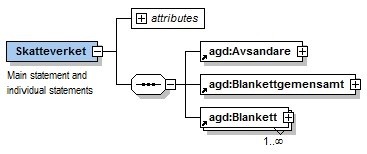
The file is divided into three main parts. The file can contain PAYE tax returns and contact information from multiple registered employers and multiple accounting periods.
The XML file consists of the following information:
- sender information
- common form information
- one or more main statements and/or individual statements
For more information, see appendix XML document structure.
9.6 XML schema changes
The schema for XML files that can be uploaded to the PAYE tax return e-service has a version number. The current schema has version number 1.1.
Changes that make the schema more “generous”, such as when more fields are added, the schema’s version number is not changed. This is to signal that files based on the previous schema version will be uploaded even with the new schema version. In other words, everything that was allowed before the schema change will also be allowed in the new schema version.
Such schema changes that does affect files based on the previous schema version, will receive a new version number. This is because files based on the previous schema version may not be validated with the new version. The reason for this may be that a certain field type allows fewer characters than the previous schema version.
10. XML structure
This chapter describes the terms used in the electronic reporting of PAYE tax returns per employee. The XML schema, as well as the XML document, are based on this description. For more information about the structure of file content, see appendix XML document structure.
10.1 Comprehensive structure
The figure below illustrates the comprehensive structure of electronic reporting of PAYE tax returns per employee. The attribute ”omrade” of the root element ”Skatteverket” should be set to ”Arbetsgivardeklaration”.
10.2 Attributes
This section describes the attributes that must be specified for certain elements in the file.
10.2.1 The attribute ”omrade” for the element ”Skatteverket”
The attribute ”omrade” is mandatory and should be set to ”Arbetsgivardeklaration”.
10.2.2 The attribute ”faltkod” for the data elements
The attribute ”faltkod” is mandatory and fixed, and has to have the same field code that appears in the corresponding form in the PAYE tax return per employee. For more information about the connection between form and field code, see appendix Field list.
10.3 Value ranges
The value ranges are listed in appendix Field list, the tab Field type, and in appendix Country and remuneration codes.
10.4 XML sample files
In addition to the described XML structure for filing, sample files are provided, see appendix Sample files.
10.5 Test of accounts in XML format
If you want to test your XML files with the PAYE tax return per employee, you can use the test service Testa arbetsgivardeklaration, which is available on the Tax Agency’s web site. The test file cannot exceed 100 MB.
The test run generates a report describing errors found in the course of the test. The following page explains the errors messages generated from scheme validation errors:
11. Appendices
11.1 Appendix XML document structure
The appendix describes the file structure of files containing PAYE employee tax returns.
11.2 Appendix Sample files
The appendix contains several examples of files containing individual and/ or main statements intended for the PAYE tax return. The examples are also available in XML format.
11.3 Appendix Field list
The appendix lists field codes for fields that may appear in the XML schema, together with their element names. Each field code is accompanied by a description and also information about which form the field code appears in.
The appendix also contains a list of all field types and their names and descriptions.
11.4 Appendix Country and remuneration codes
The appendix specifies the valid country codes. The country name is specified in text along with a two character country code written in capital letters.
The appendix also specifies the valid remuneration codes for pension and insurance payments. The remuneration type is described in text along with a three character code.
11.5 Appendix controls
The appendix describes the various control types.
11.5.1 Processing controls
Processing controls are made when the data file is being uploaded. These are both technical controls and business related controls. Should any of these controls fail, the data file will not be uploaded. These controls have Control key = ba_nnn.
11.5.2 Associated controls within forms
Associated controls compare the content in and between different fields in an individual or main statement. The purpose is to verify that the correlation between the fields comply with the substantive requirements. The associated controls have Control key = S_nnn.
Associated controls are activated if one or more requirements within a form are not met. The non-compliance must be resolved before you can file the PAYE tax return.
11.5.3 Associated controls between forms
These controls compare the content in and between different fields when the fields appear in different forms in the PAYE tax return (individual and main statement). The purpose is to verify that the correlation between the fields comply with the substantive requirements. The associated controls have Control key = B_nnn.
Associated controls between forms are activated if one or more requirements are not met. The non-compliance must be resolved before you can file the PAYE tax return.
11.5.4 Reasonability checks
In a reasonability check the system checks for unreasonable values, or relations between fields, within an individual or main statement. The checks have Control key = R_nnn.
Reasonability checks are activated when specified conditions are not met. The checks are not stopping, but the information should be verified before you submit the PAYE tax return.
11.6 Appendix Summary and calculation rules
Calculating the total sum of employer’s contributions, special payroll tax on income, and the total sum of tax deductions, requires a number of aggregations and calculations.
If you have filled in the fields SummaArbAvgSlf (FK487) and SummaSkatteavdr (FK497), the Swedish Tax Agency make calculations to reach the comparative sum based on reported sums in the individual and main statement. The Swedish Tax Agency make their calculations based on available internal codes (interna koder, IK). Then, the calculated sums are compared with the sums reported in the main statement in the PAYE tax return, SummaArbAvgSlf (FK487) and SummaSkatteavdr (FK497). If the values correlate with the values calculated by the Swedish Tax Agency, you may file the PAYE tax return.
If an uploaded file does not include the fields SummaArbAvgSlf (FK487) and SummaSkatteavdr (FK497), or if you have reported the individual statement directly in the e-service, the Swedish Tax Agency will display the result, based on the provisions in appendix Summary and calculation rules. Summaries and calculations are described in the diagram and text below.
11.6.1 Total employer’s contribution and special payroll tax on certain income
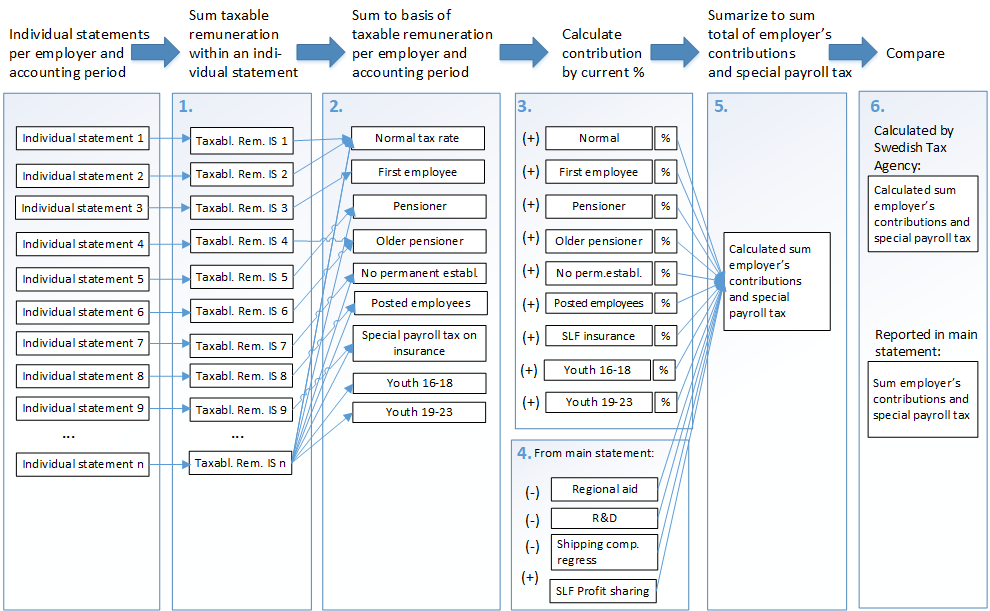
- Taxable remunerations are summarised within their respective individual statement. Amounts that result from calculating car fuel benefits are rounded off.
If more than one individual statement is submitted for the same person in the same accounting period, and the employer are eligible for reduced employer’s contribution for this person up to SEK 25 000 (First employee, Youth 16-18 accounting periods 201908-202312 and Youth 19-23 accounting periods 202101-202303), the basis for contributions is calculated based on the total income from all individual statements for that person. This calculation makes it possible to allocate the income to the right basis, up to, or above, SEK 25 000, in step 1 below. In cases when the person has individual statements, both with and without a convention code, or with different convention codes, the basis is allocated so the contribution is calculated to the lowest alternative. - For each registered employer and accounting period, all taxable remunerations are summarised, from the individual statements to their respective basis per tax rate, which are:
Individuals who have not turned 66 (up to year 2022, 65) at the beginning of the year (IK420)
Details of first employee, growth-support (IK421, IK7002 och IK7004)
Individuals who are 66 years (up to year 2022, 65) or older at the beginning of the year, and born in 1938 or later (IK422)
Individuals born in 1937 or earlier (IK423)
Individuals who have turned 15 but not 18 at the beginning of the year (IK424), accounting periods 201908-202312,
Individuals who have turned 18 but not 23 at the beginning of the year (IK7001). Accounting periods 202101-202303.
Enterprises and embassies with no permanent establishment in Sweden (multiple rates apply, IK440 - IK443, IK7003)
Expatriates, to or from Canada, U.S.A, et cetera in accordance with section 4.4 (multiple rates apply, IK700 – IK797, IK7005 - IK7020)
SLF (Special payroll tax) on insurance payments (IK480).
For more information, see appendices Summary and calculations rules. - If an employer has employees who are subject to multiple tax rates, the employer’s contributions should be calculated separately for each rate. The rates are calculated by multiplying each basis with the current rate. Rates are rounded off on each percentage separately. For more information, see the tab Tax rate in appendix Summary and calculation rules.
- If a–d below appear in the main statement, they should be added or removed in this step:
- Addition of SlfVinstandelFK486 (FK486)
- Deduction for AvdragFoU (FK475)
- Deduction for AvdragRegionaltStod (FK476)
- Deduction for shipping company recourse (FK477)
4.Then, calculations are made of the total sum of employer’s contributions and special payroll tax by summarising the following sub totals:
+Sub totals of employer’s contributions tax rate
+SlfVinstandelFK486 (FK486)
- AvdragFoU (FK475)
- AvdragRegionaltStod (FK476)
- AvdragRederiRegress (FK477)
= The Swedish Tax Agency’s calculation of the sum of employer’s contributions and special payroll tax on income (IK587). - If SummaArbAvgSlf (FK487) has been specified in the file, it will be compared to the field BeraknadSummaArbAvgSlf (IK587), which has been calculated by the Swedish Tax Agency. This is done using the control B_006 (see appendix Controls).
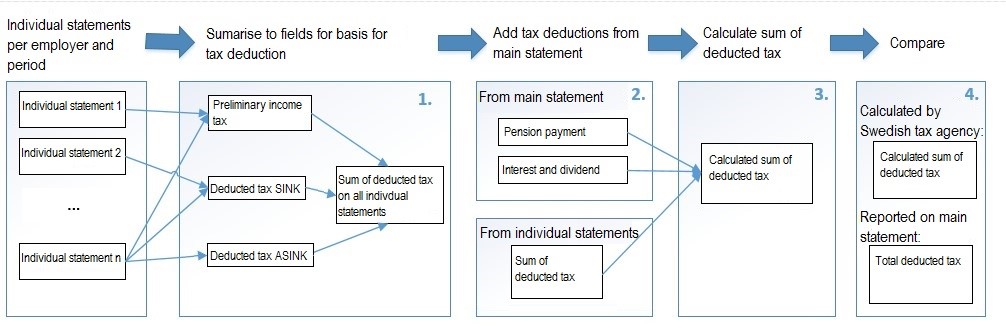
- Summarise the tax deductions from all individual statements (AvdrPrelSkatt (FK001), AvdrSkattSINK (FK274) and AvdrSkattASINK (FK275) to sum tax deductions in individual statements (IK494).
- If a–b below appear in the main statement, they should be added to the calculation of the added tax deductions.
a. SkatteavdrPensFors (FK495) and
b. SkatteavdrRantaUtd (FK496) - Summarise the tax deductions by adding the following:
+ Sum tax deductions in individual statements (IK494)
+ SkatteavdrPensFors (FK495)
+ SkatteavdrRantaUtd (FK496)
= The Swedish Tax Agency’s calculation of the sum of tax deductions (IK597) - If SummaSkatteavdr (FK497) has been specified in the file, it will be compared to the field BeraknadSummaSummaSkatteavdr (IK597), which has been calculated by the Swedish Tax Agency. This is done using the control B_007 (see appendix Controls).
12. Technical support and other questions
For questions about the technical format or the e-service, as well as for other types of questions, please use the online form. You can also make a phone call at 0771-567 567. If you are abroad, dial +46 8 564 851 60.
Appendices to the technical description
XML schema
Use the XML schema (version 1.1), based on Technical description 1.1.16, if you want to test PAYE tax returns per employee.