How to use our e-service Property tax return, Agricultural property
This is a guide on how to use the e-service Property tax return, Agricultural property.
Log in to the e-service
1. How to log in to the e-service
When you have selected the e-service you want to log in to, a login page will open. In the upper part of the view you can change the language to English by clicking the button ”English”. By choosing ”International” you get more alternatives for eIDs you can use to log in to the e-service. Select the login mode that suits you best by clicking it, and then proceed to identify yourself.

2. Ownership and tax assessment units
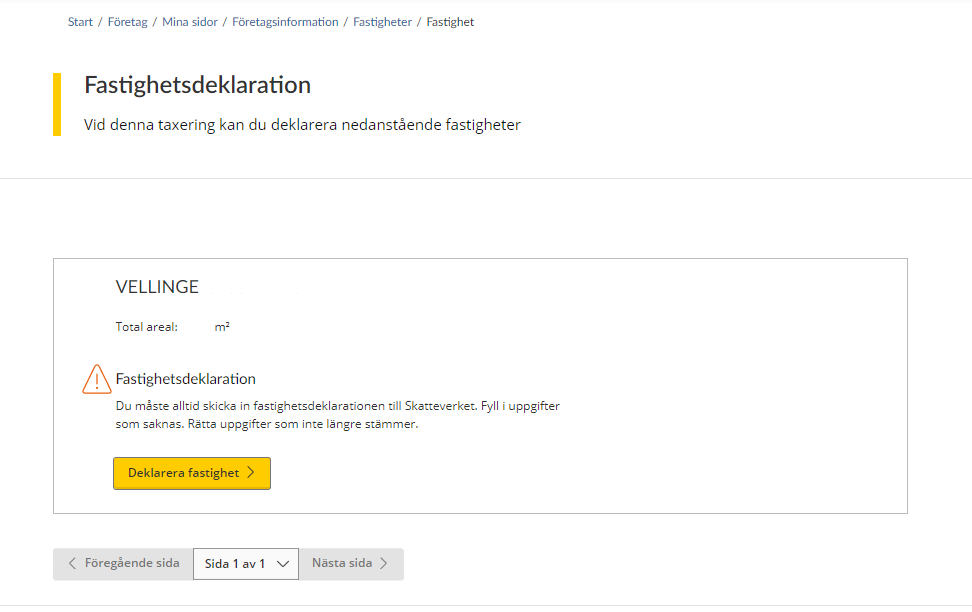
When you have logged in to the e-service, the first page opens and shows you the properties you have to declare for your current property tax assessment.
Each tax assessment unit that must be declared is individually marked in its own box. Details of the tax assessment unit’s property designation, assessment unit number, property type and total area are stated at the top of the box.
If you as the property owner have received a draft of the property’s new assessed value, you have to check that the details are correct. If all the details in the draft are correct, you don’t need to submit anything to the Swedish Tax Agency; your silent approval of the draft is sufficient.
However, if you need to change any of the prefilled details, you must provide the Swedish Tax Agency with the relevant details.
If you as the property owner have received a property tax return, you need to provide the Swedish Tax Agency with information about your property, and submit the tax return to us.
“File property tax return” button – This is the button you click in order to change the details in the draft of the property’s new assessed value you have been sent, or to file a tax return for your property. To proceed with providing information about your property, click the button marked “Deklarera fastighet” (“File property tax return”).
You will be directed to various pages within the e-service, depending on which information you need to provide.
If you wish to move between different pages in the e-service, click the button marked “Nästa sida” (“Next page”) to move forward, or the button marked “Föregående sida” (“Previous page”) to go back.
Pagination is used so that a certain number of properties are shown on each page. You can therefore use the drop-down menu on the button marked “Sida x av x” (“Page x of x”) if you want to go straight to a specific page.
3. File a property tax return
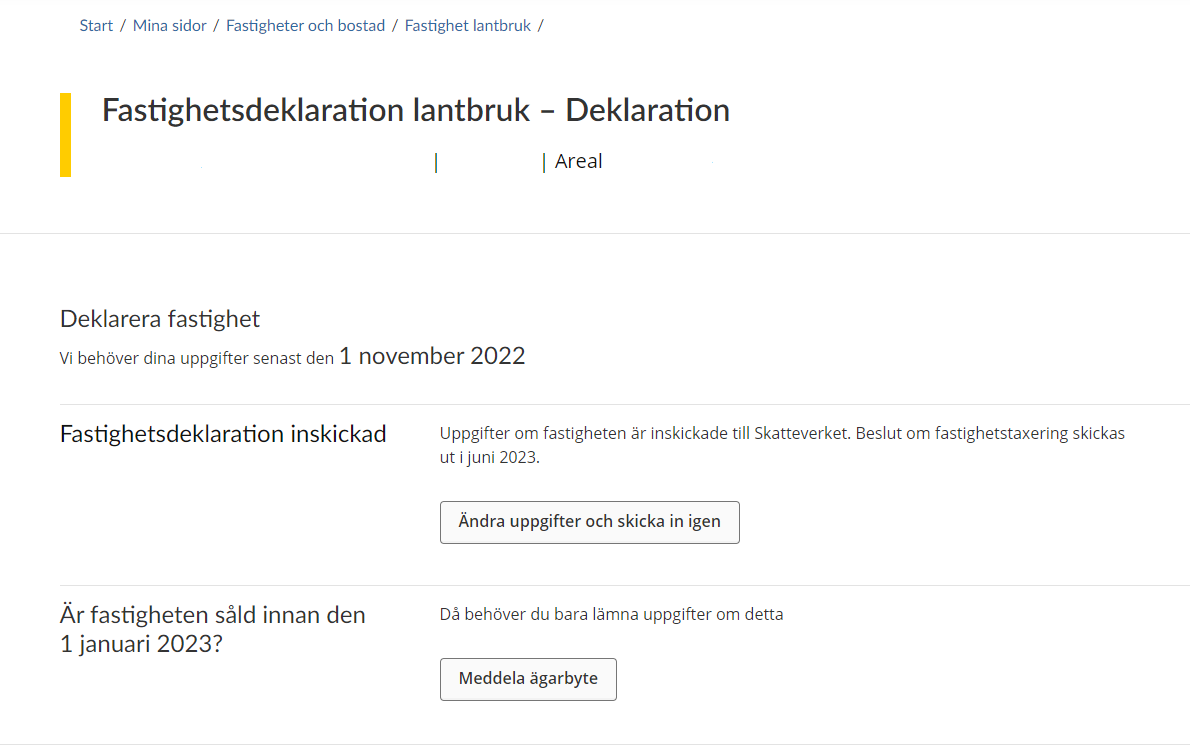
If you have chosen to file a property tax return for a tax assessment unit, you will be directed to the next page in the e-service. Here, you will be informed that you need to submit information to us before the submission deadline by.
You need to submit information about the property in order for the Swedish Tax Agency to be able to calculate its correct assessed value. You do this by clicking on the button “Lämna uppgifter” (“Submit information”).
If the property was sold before 1 January the year of assessment, you just need to notify the Swedish Tax Agency of the change of ownership. You do this by clicking on the button “Meddela ägarbyte” (“Submit change of ownership notification”). (See section 3.7)
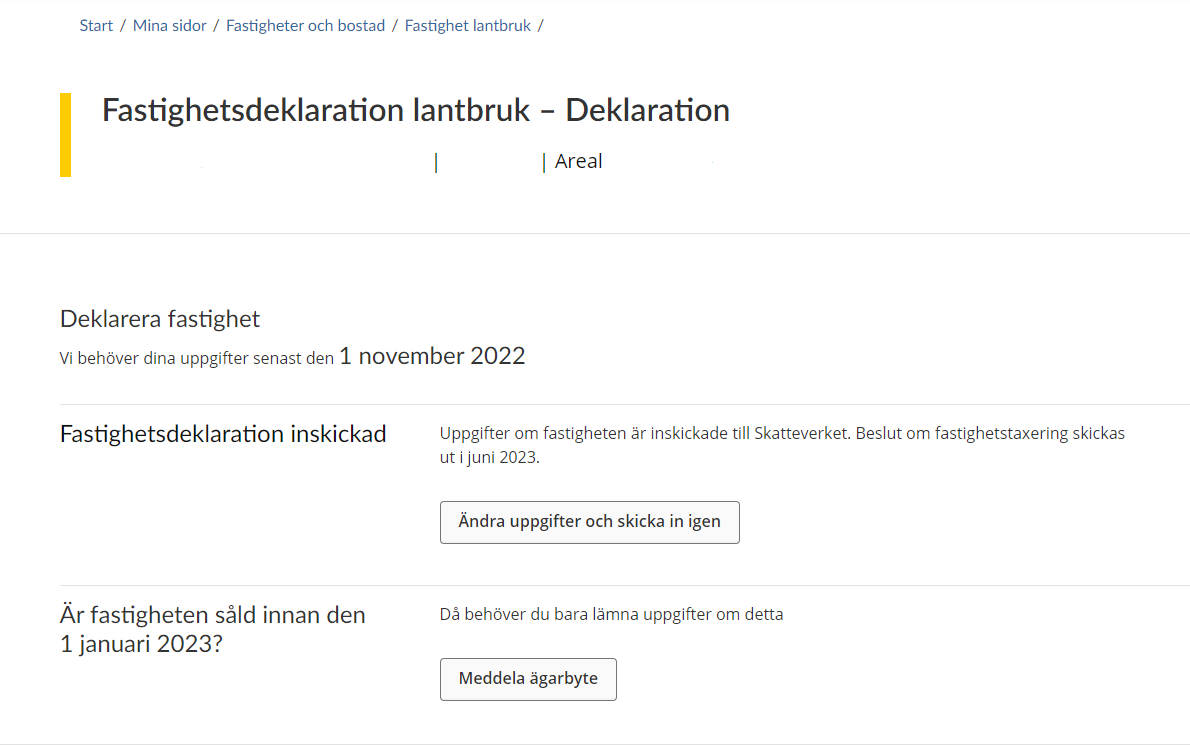
This is an example from the e-service.
3.1 Overview of value units for taxation
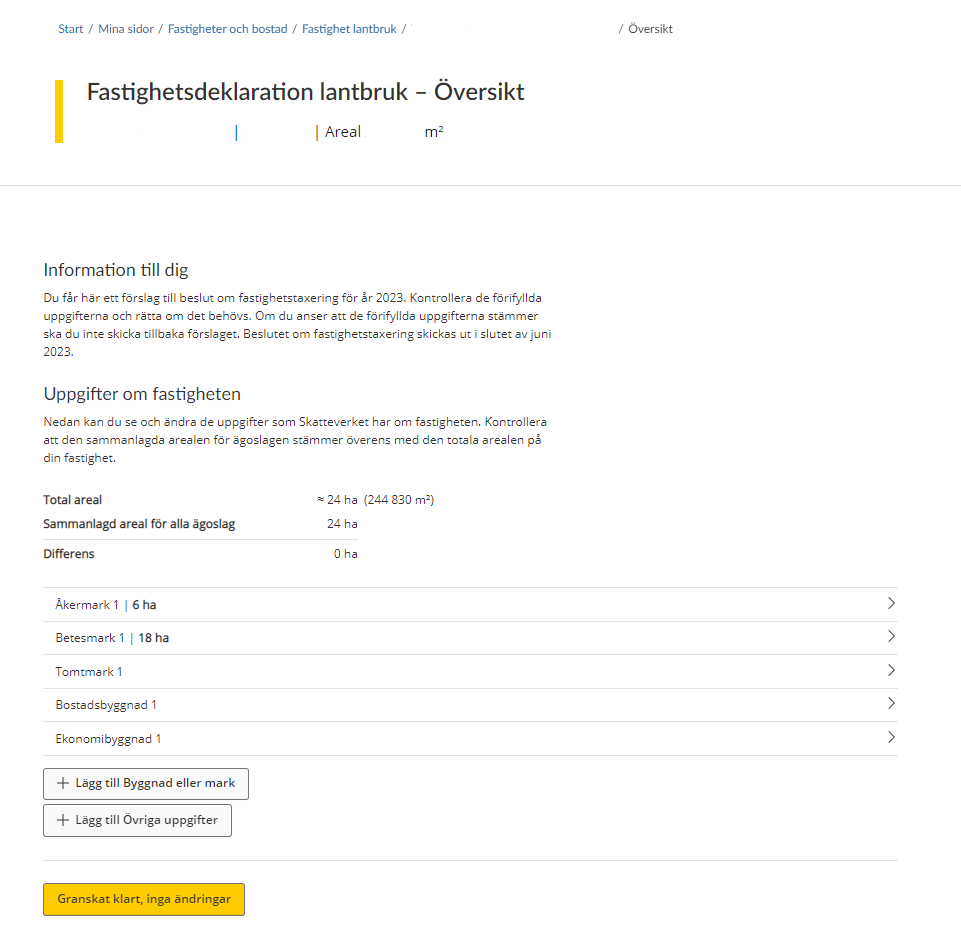
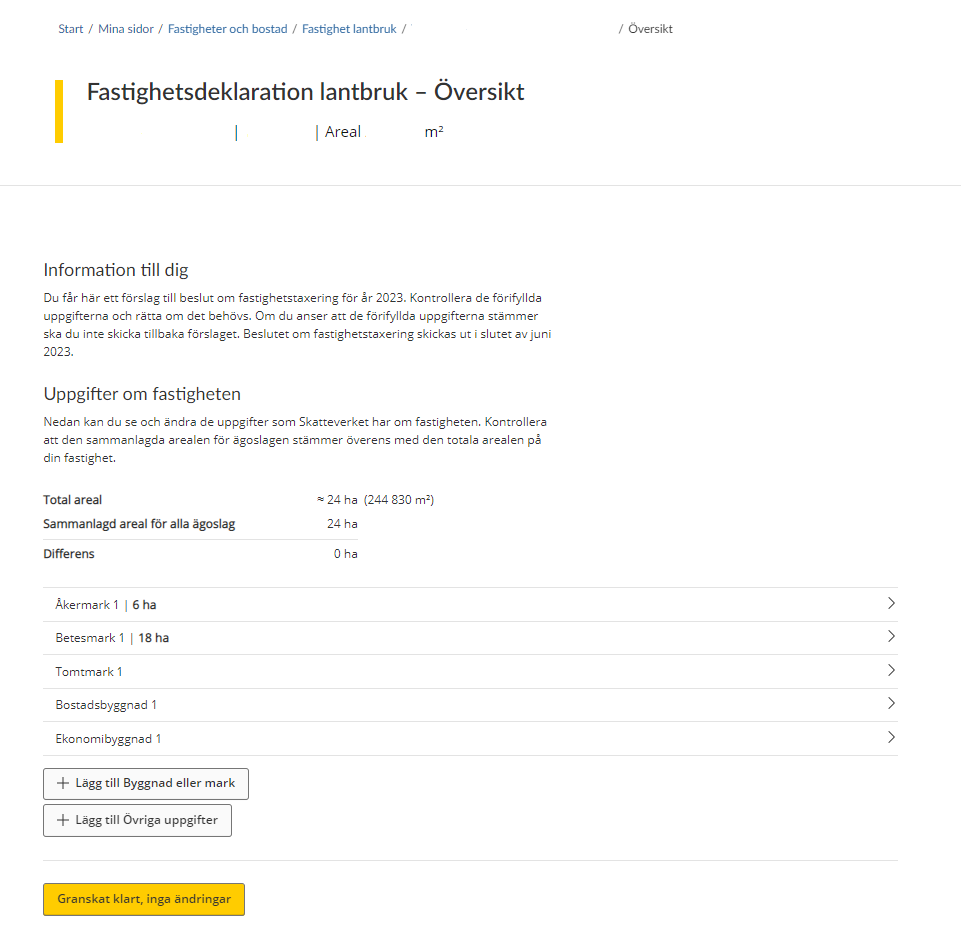
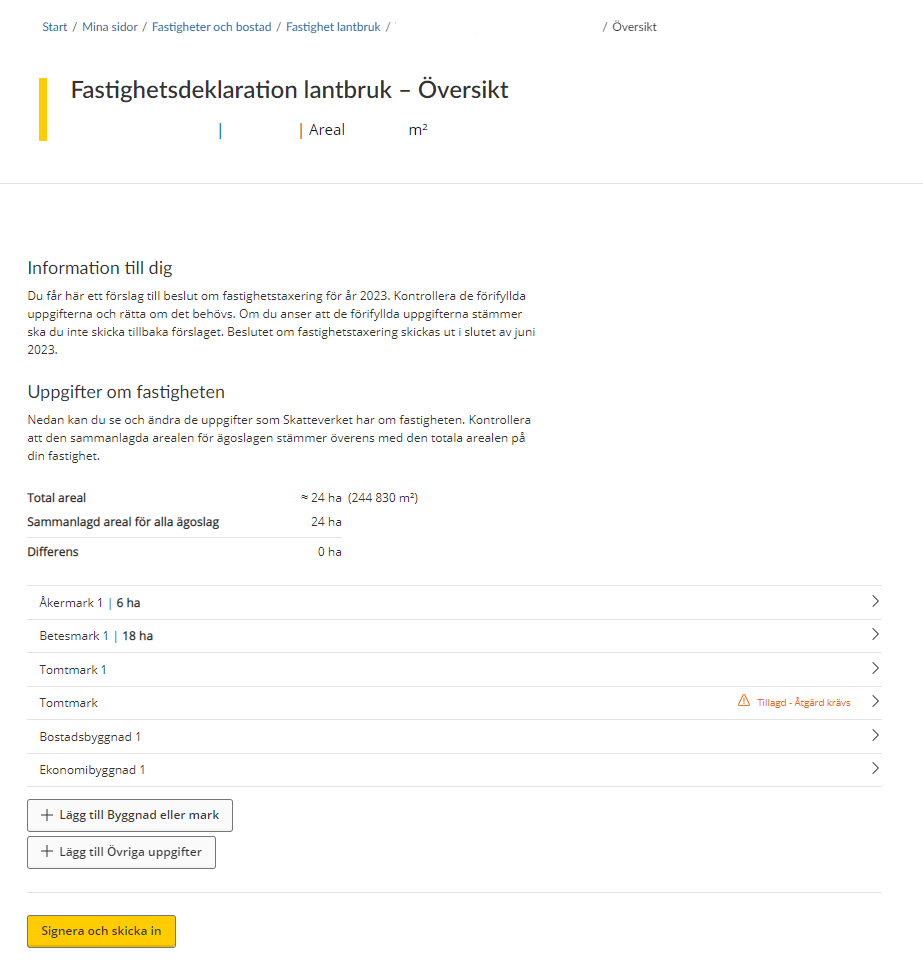
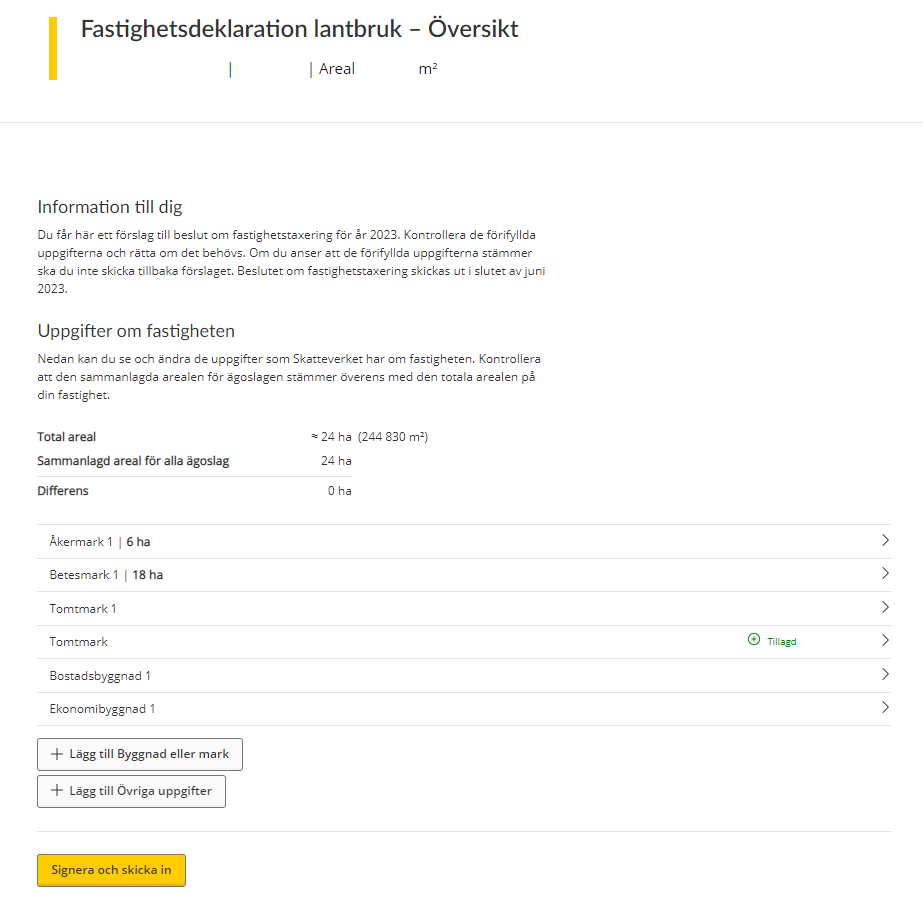
If you have chosen to provide us with information about a tax assessment unit, you will be directed to page that provides an overview of all your land and buildings. If you click on a plot of land or a building, a page will open up, showing you all the information that the Swedish Tax Agency has about that value unit for taxation.
If the list does not include all value units for taxation, you can add a value unit yourself by clicking on the button “Lägg till Byggnad eller mark” (“Add building or plot of land”). (See section 3.3)
If you want to submit a piece of information to the Swedish Tax Agency, you can click on the button marked “Lägg till Övriga uppgifter” (“Add further details”). You will then be directed to a free text field where you can enter the relevant details. (See section 3.6)
3.2 Submit information
In this section of the e-service you can provide information regarding productive forest land.
3.2.1 Productive forest land – with felling restrictions
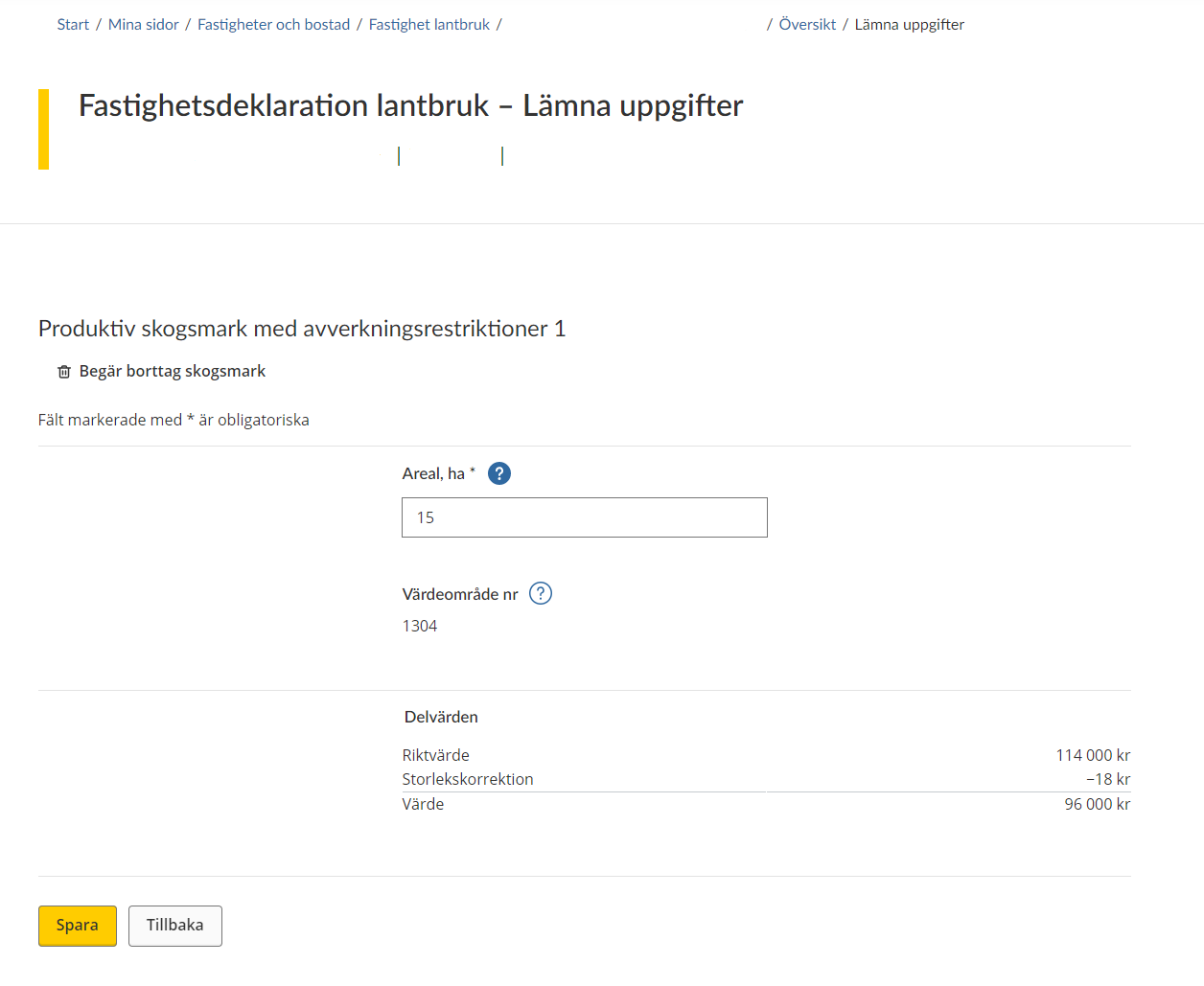
If you need to submit information about productive forest land, you will be directed to a form to fill in. All the information that the Swedish Tax Agency needs to know about your land is specified on this form.
The land concerned is stated (by numbering) at the top of the form. You also have the option of removing the land in question by clicking on the wastebasket icon marked “Begär borttag skogsmark” (“Request removal of forest land”). (See section 3.5)
Note that information marked with an asterisk (*) is required.
You must/can also provide information about the following:
- “Areal*” (Area*), expressed in hectares without decimals.
- “Värdeområde nr” (Asset area no.) – the asset area number will be shown if it has been determined.
- “Delvärden” (Partial values) – partial values will be shown if they have been determined.
Click on the button marked “Spara” (“Save”) to save the information. You will then be taken back to the overview page where all value units are listed. (See section 3.1)
If you click on “Save” when a piece of information is missing, you will see an error message outlining what needs to be done before the information can be saved.
If you want to go back to the overview page without saving any information, click on the button marked “Tillbaka” (“Back”). (See section 3.1)
3.2.2 Productive forest land – without felling restrictions
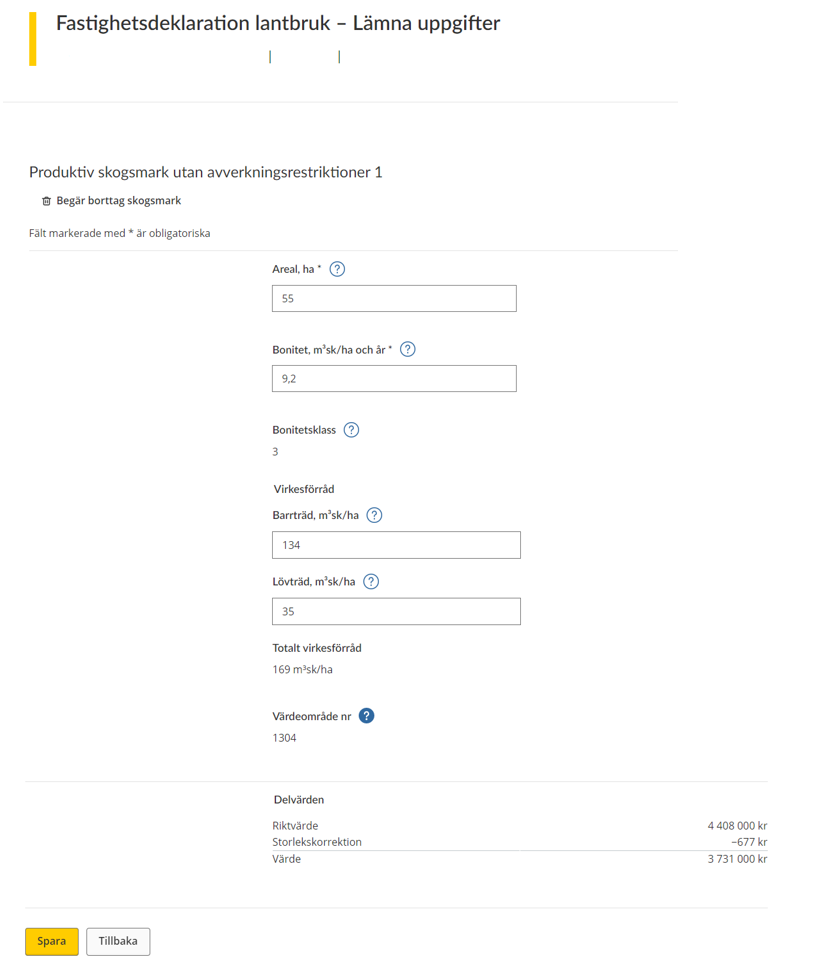
If you are going to submit information about productive forest land you will be taken to a form. All the information that the Swedish Tax Agency needs to know about your land is specified on this form.
The land concerned is specified at the top of the form (by numbering). You also have the option of removing the land in question by clicking on the wastebasket icon that says “Request removal of forest land”. (See section 3.5)
Note that information marked with an asterisk (*) is required.
On the rest of the form, you must/can provide information about the following:
- “Areal*” (Area*), expressed in hectares without decimals.
- “Bonitet” (Site quality), m³ fo/ha and year* – the site quality is a measure of the site’s timber-producing capacity and must be specified in forest cubic metres per hectare and year.
- “Bonitetsklass” (Site quality class) – worked out by the Swedish Tax Agency
- “Virkesförråd” (Standing volume)
- Softwood (conifers), m³ fo/ha – state in forest cubic metres how much of the standing volume consists of softwood trees.
- Hardwood (deciduous trees), m³ fo/ha – state in forest cubic metres how much of the standing volume consists of hardwood trees.
- Total standing volume – state the total standing volume.
- “Värdeområde nr” (Asset area no.) – the asset area number will be shown if it has been determined.
- “Delvärden” (Partial values) – partial values will be shown if they have been determined.
Click on the button marked “Spara” (“Save”) to save the information. You will then be taken back to the overview page where all value units are listed. (See section 3.1)
If you click “Save” when a piece of information is missing, you will see an error message outlining what needs to be done before the information can be saved.
If you want to go back to the overview page without saving any information, click on the button marked “Tillbaka” (“Back”). (See section 3.1)
3.2.3 Unproductive forest land
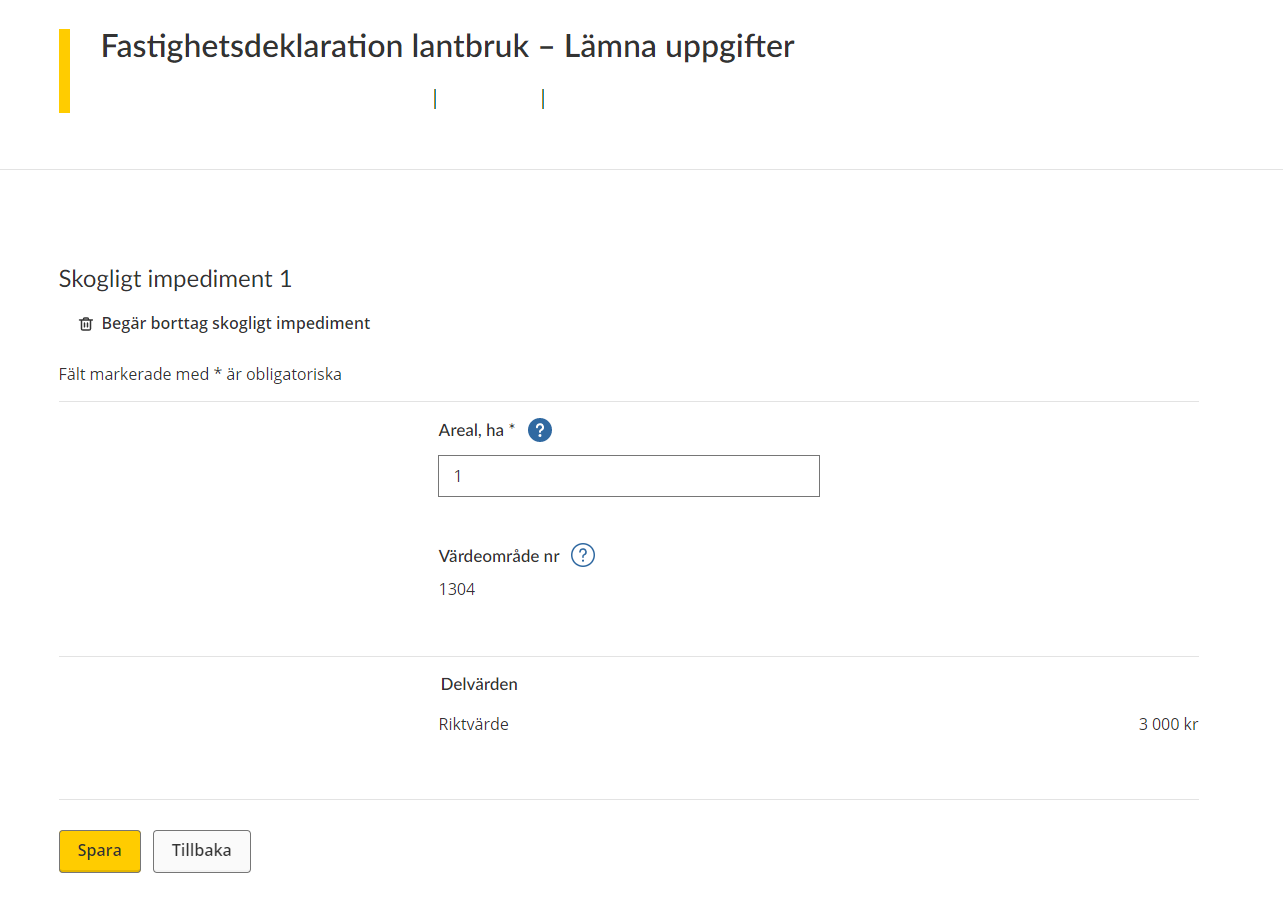
If you are going to submit information about unproductive forest land, you will be taken to a form. All the information that the Swedish Tax Agency needs to know about your unproductive forest land is specified on this form.
The unproductive forest land concerned is specified at the top of the form (by numbering). You also have the option of removing the unproductive forest land in question by clicking on the wastebasket icon that says “Begär borttag skogligt impediment” (“Request removal of unproductive forest land”). (See section 3.5.)
Note that information marked with an asterisk (*) is required.
On the rest of the form, you have to/can provide information about the following:
- “Areal, ha*”: Area*, expressed in hectares without decimals.
- “Värdeområde nr” (Asset area no.) – the asset area number will be shown if it has been determined.
- “Delvärden” (Partial values) – partial values will be shown if they have been determined.
Click on the button marked “Spara” (“Save”) to save the information. You will then be taken back to the overview page where all value units are listed. (See section 3.1)
If you click “Save” when an item of information is missing, you will see an error message outlining what needs to be done before the information can be saved.
If you want to go back to the overview page without saving any information, click on the button marked “Tillbaka” (“Back”). (See section 3.1)
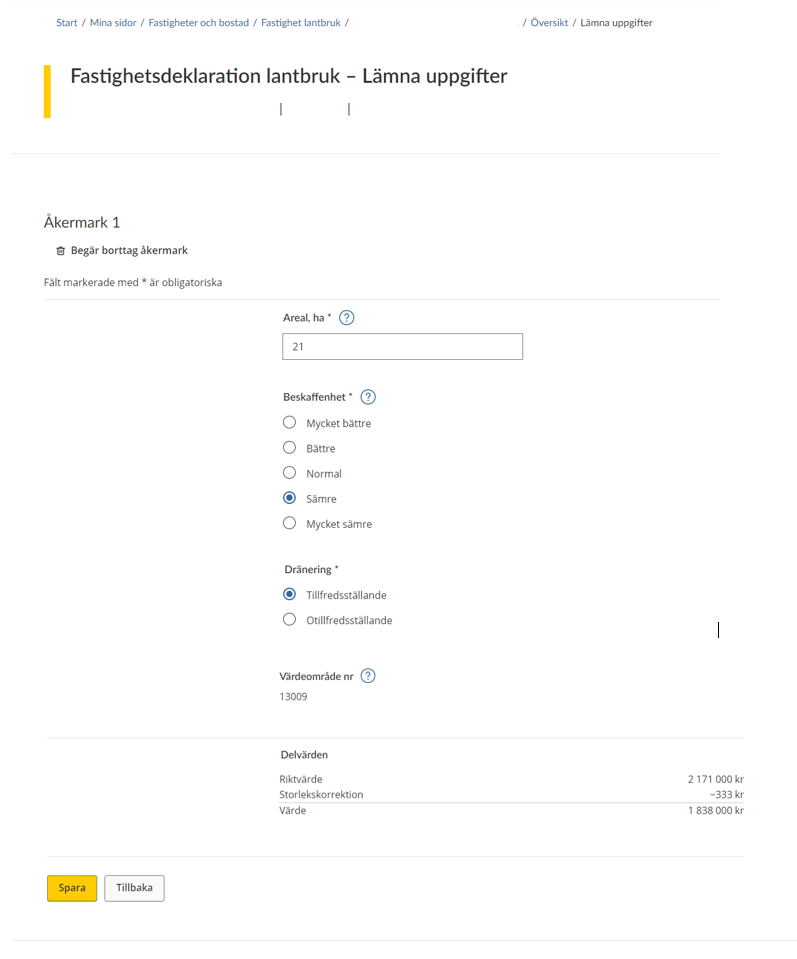
3.2.4 Arable land
If you are going to submit information about arable land, you will be taken to a form. All the information that the Swedish Tax Agency needs to know about your arable land is specified on this form.
The arable land concerned is specified at the top of the form (by numbering). You also have the option of removing the arable land in question by clicking on the wastebasket icon that says “Begär borttag åkermark” (“Request removal of arable land”). (See section 3.5)
Note that information marked with an asterisk (*) is required.
On the rest of the form, you must/can provide information about the following:
- “Areal, ha*”: Area*, expressed in hectares without decimals.
- “Beskaffenhet*”: Quality* – land productivity and cultivation conditions.
- “Mycket bättre” (Very good)
- “Bättre” (Good)
- Normal
- “Sämre” (Bad)
- “Mycket sämre” (Very bad)
- “Dränering*”: Drainage*
- “Tillfredsställande” (Satisfactory)
- “Otillfredsställande” (Unsatisfactory)
- “Värdeområde nr” (Asset area no.) – the asset area number will be shown if it has been determined.
- “Delvärden” (Partial values) – partial values will be shown if they have been determined.
Click on the button marked “Spara” (“Save”) to save the information. You will then be taken back to the overview page where all value units are listed. (See section 3.1)
If you click on “Save” when a piece of information is missing, you will see an error message outlining what needs to be done before the information can be saved.
If you want to go back to the overview page without saving any information, click on the button marked “Tillbaka” (“Back”). (See section 3.1)
3.2.5 Pasture land
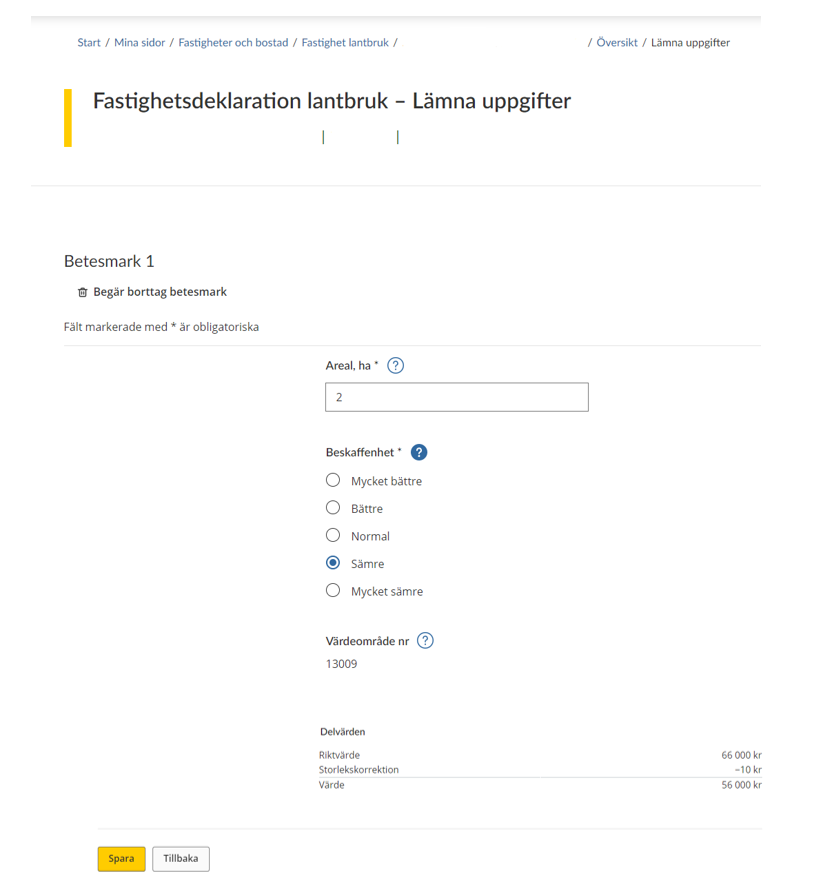
If you are going to submit information about pasture land, you will be taken to a form. All the information that the Swedish Tax Agency needs to know about your pasture land is specified on this form.
The pasture land concerned is specified at the top of the form (by numbering). You also have the option of removing the pasture land in question by clicking on the wastebasket icon that says “Begär borttag betesmark” (“Request removal of pasture land”). (See section 3.5)
Note that information marked with an asterisk (*) is required.
On the rest of the form you must/can provide information about the following:
- “Areal, ha*”: Area*, expressed in hectares without decimals.
- “Beskaffenhet*”: Quality* – land productivity and cultivation conditions.
- “Mycket bättre” (Very good)
- “Bättre” (Good)
- Normal
- “Sämre” (Bad)
- “Mycket sämre” (Very bad)
- “Värdeområde nr” (Asset area no.) – the asset area number will be shown if it has been determined.
- “Delvärden” (Partial values) – partial values will be shown if they have been determined.
Click on the button marked “Spara” (“Save”) to save the information. You will then be taken back to the overview page where all value units are listed. (See section 3.1)
If you click on “Save” when a piece of information is missing, you will see an error message outlining what needs to be done before the information can be saved.
If you want to go back to the overview page without saving any information, click on the button marked “Tillbaka” (“Back”). (See section 3.1.)
3.2.6 Land
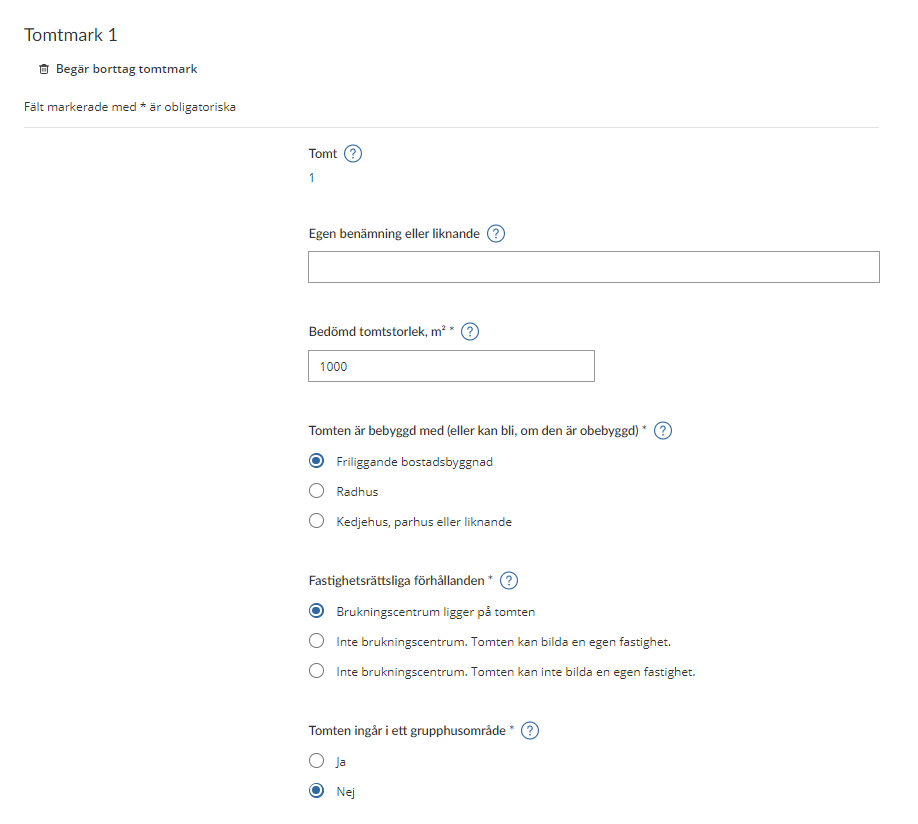
If you opt to click on a land belonging to the property, or if you opt to add land, you will be shown a form. All the information that the Swedish Tax Agency needs to know about your land in specified on this form.
At the top of the form, you have the option of removing land. You do so by clicking on the wastebasket icon that says “Begär borttag tomtmark” (“Request removal of land”). (See section 3.5)
Note that information marked with an asterisk (*) is required.
On the rest of the form, you must/can provide information about the following:
- “Tomt” (Land plot) – A special number must be specified here to differentiate between all value units.
- “Egen benämning eller liknande” (Own designation or similar) – Here you state your own designation in order to distinguish one or more of your land plots apart.
- “Bedömd tomtstorlek” (Assessed size of land plot), m2* – Here you state the area of the land plot in square metres.
- “Tomten är bebyggd med (eller kan bli, om den är obebyggd)” (The land plot has the following buildings on it (or could have, if it is undeveloped)*)
- “Friliggande bostadsbyggnad” (Detached residential building)
- “Radhus” (Terraced house)
- “Kedjehus, parhus eller liknande” (Linked house, semidetached house or similar)
- “Fastighetsrättsliga förhållanden*” (Circumstances in relation to property law*)
- “Brukningscentrum ligger på tomten.” (Headquarters on the land plot.)
- “Inte brukningscentrum. Tomten kan bilda en egen fastighet.” (Not headquarters. The land plot can form a separate property.)
- “Inte brukningscentrum. Tomten kan inte bilda en egen fastighet.” (Not headquarters. The land plot cannot form a separate property.)
- “Tomten ingår i ett grupphusområde*” (The land plot is part of a property development area*)
- “Ja” (Yes)
- “No” (No)
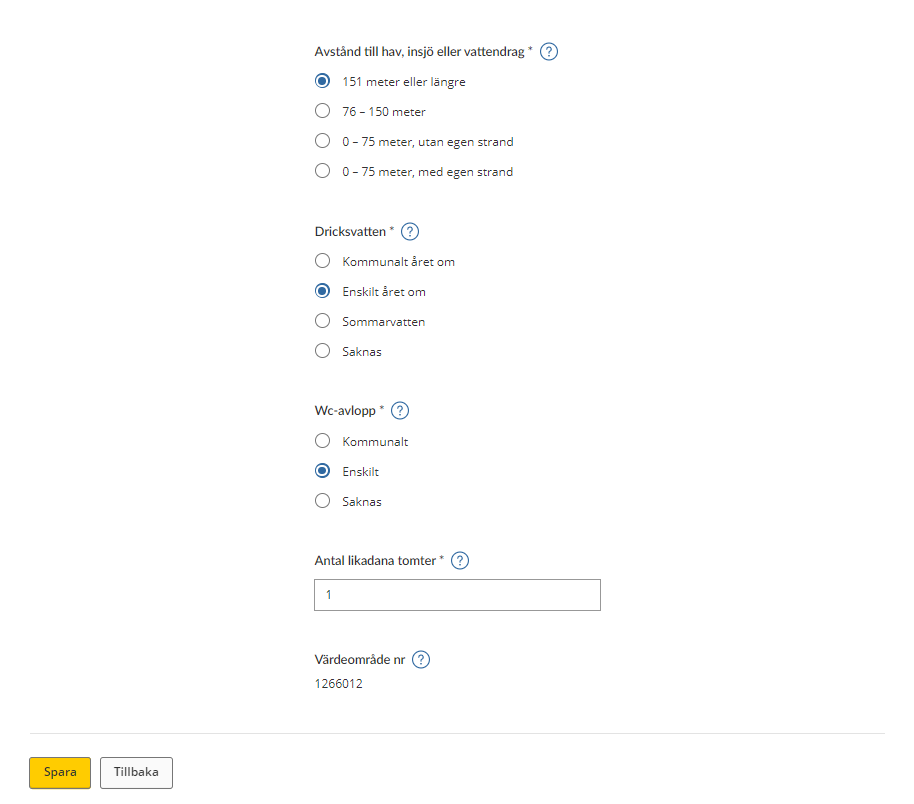
- “Avstånd till hav, insjö eller vattendrag*” (Distance to the sea, a lake or watercourse*)
- “151 meter eller längre” (151 metres or more)
- “76 – 150 meter” (76-150 metres)
- “0 – 75 meter, utan egen strand” (0-75 metres, with no private beach)
- “0 – 75 meter, med egen strand” (0-75 metres, with private beach)
- “Dricksvatten*” (Drinking water*)
- “Kommunalt året om” (Municipal all year round)
- “Enskild året om” (Private source all year round)
- “Sommarvatten" (Summer water)
- “Saknas” (None)
- “Wc-avlopp*” (WC sewage disposal*)
- “Kommunalt (Municipal)
- “Enskilt” (Private)
- “Saknas” (None)
- “Antal likadana tomter*” (Number of land plots of the same kind*) – Here, state the number of land plots of the same kind
- “Värdeområde nr” (Asset area no.) – The asset area number will be shown if it has been determined.
Click on the button marked “Spara” (“Save”) to save the information. You will then be taken back to the overview page where all value units are listed. (See section 3.1)
If you click on “Save” when an item of information is missing, you will see an error message outlining what needs to be done before the information can be saved.
If you want to go back to the overview page without saving any information, click on the button marked “Tillbaka” (“Back”). (See section 3.1)
3.2.7 Residential building
If you opt to click on a residential building belonging to the property, or if you opt to add a residential building, you will be shown a form. All the information that the Swedish Tax Agency needs to know about your residential building is specified on this form.
At the top of the form, you have the option of removing a residential building. You do so by clicking on the wastebasket icon that says “Begär borttag bostadsbyggnad” (“Request removal of residential building”). (See section 3.5)
Note that information marked with an asterisk (*) is required.
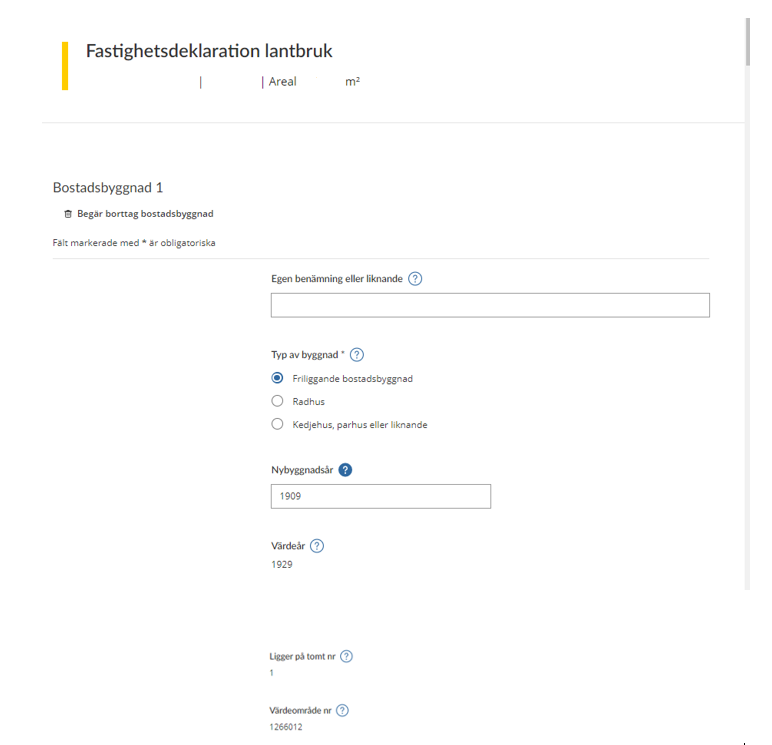
On the rest of the form, you must/can provide information about the following:
“Allmänt:” (General information):
- “Egen benämning eller liknande” (Own designation or similar) – If you want to, you can specify your own designation for your residential building.
- “Typ av byggnad*” (Type of building*)
- “Friliggande bostadsbyggnad” (Detached residential building)
- “Radhus” (Terraced house)
- “Kedjehus, parhus eller liknande” (Linked house, semidetached house or similar)
- “Nybyggnadsår” (Year of original construction) – The year in which the house became ready to move into.
- “Värdeår” (Value year) – The year of original construction of the house, no earlier than 1929 (even if the house was built before 1929).
- “Ligger på tomt nr” (Located on plot no.) – Specify here which plot the residential building lies on.
- “Värdeområde nr” (Asset area no.) – The asset area number will be shown if it has been determined.
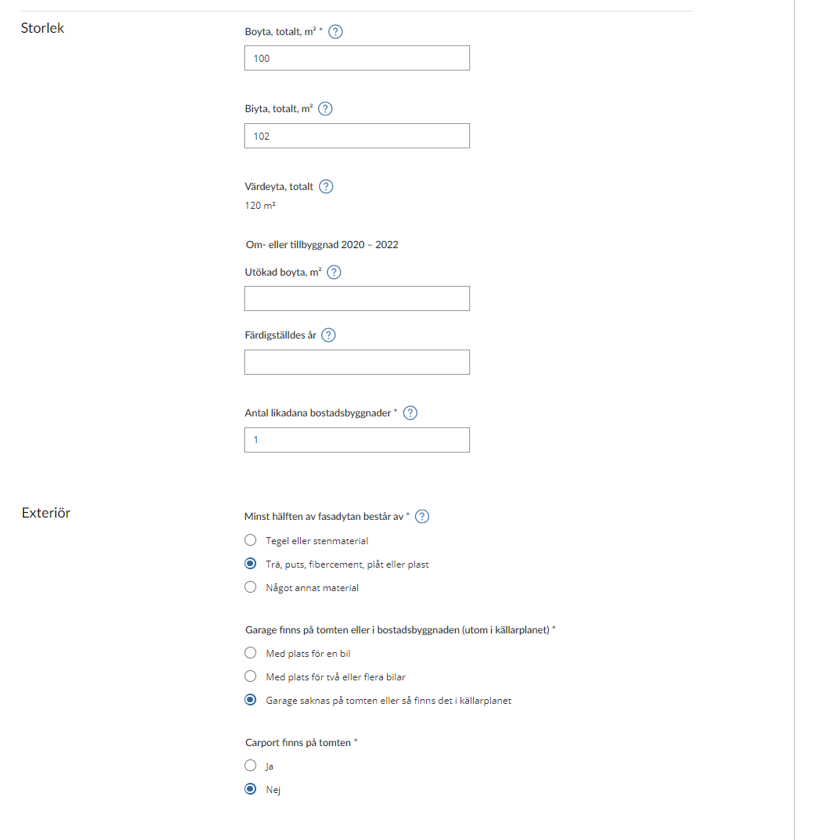
“Storlek:” (Size):
- “Boyta, totalt m²*” (Floor area, total m²*) – Specify the total floor area in square metres.
- “Biyta, totalt m² ” (Ancillary area, total m²*) – Specify the ancillary area in square metres.
- “Värdeyta totalt” (Total asset area) – State the sum of the floor area and 20 per cent of the ancillary area.
“Om- eller tillbyggnad” (Conversion or extension) 2020-2022
- “Utökad boyta m² ” (Increased floor area m²) – The area that was added after completion of the conversion or extension, in square metres.
- “Färdigställdes år” (Year of completion) – The year in which the conversion or extension was ready to begin to be used.
- “Ange antal likadana bostadsbyggnader* (State the number of residential buildings of the same kind*)
“Exteriör:” (Exterior):
- "Minst hälften av fasadytan består av*” (At least half of the building’s frontage is*)
- “tegel eller stenmaterial” (brick or other masonry)
- “trä, puts, fibercement, plåt eller plast” (timber, exterior plaster, fibre cement, sheet metal, or plastic)
- “något annat material” (some other material)
- “Garage finns på tomten eller i bostadsbyggnaden (utom i källarplanet)*” (There is a garage on the plot or in the residential house (except in the basement)*)
- “med plats för en bil” (with space for one car)
- “med plats för två eller fler bilar” (with space for two or more cars)
- “garage saknas på tomten eller så finns det i källarplanet” (there is no garage on the plot, or it is in the basement)
- “Carport finns på tomten*” (There is a carport on the plot*)
- “Ja” (Yes)
- “Nej” (No)
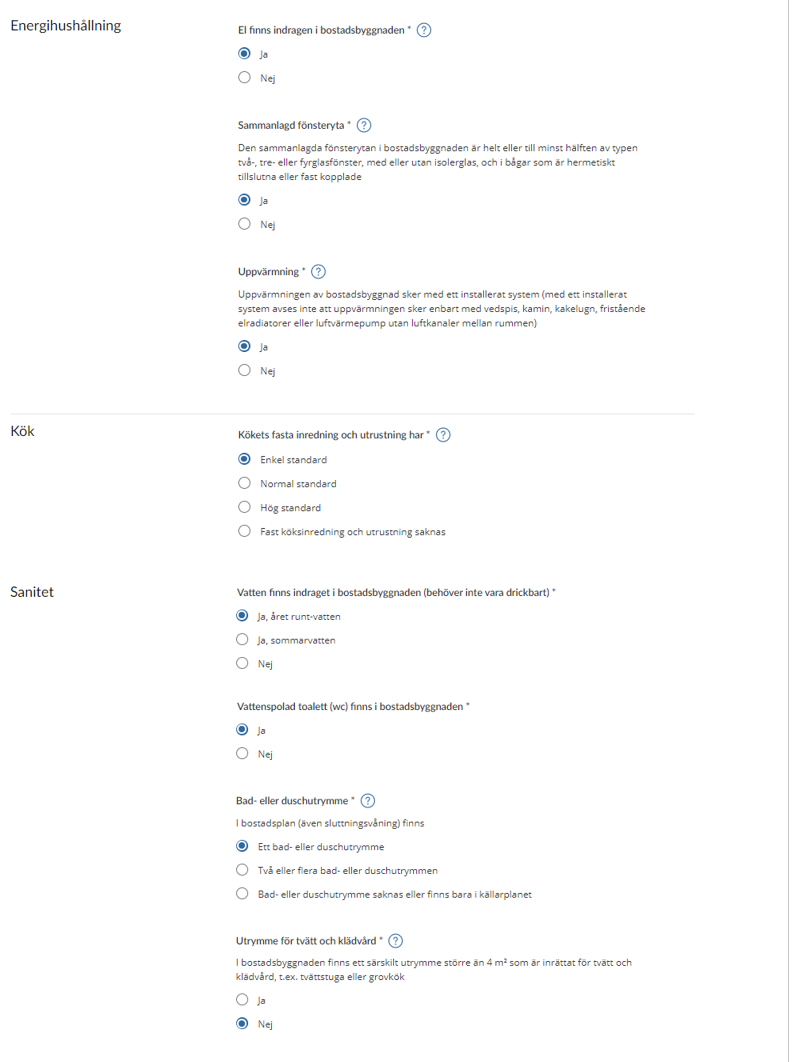
“Energihushållning:” (Energy management):
- “El finns indragen i bostadsbyggnaden*” (The residential building is wired for electricity*)
- “Ja” (Yes)
- “Nej” (No)
- “Sammanlagd fönsteryta*” (Total glazed area*)
“Den sammanlagda fönsterytan i bostadsbyggnaden är helt eller minst hälften av två-, tre-, eller fyrglasfönster, med eller utan isolerglas, och i bågar som är hermetiskt tillslutna eller fast kopplade” (The total glazed area in the residential building consists wholly or to at least 50 per cent of double, triple or quadruple glazing, with or without thermopane, and in casements that are hermetically sealed or hinged.)- “Ja” (Yes)
- “Nej” (No)
- “Uppvärmning*” (Heating*)
"Uppvärmningen av bostadsbyggnad sker med ett installerat system (med ett installerat system avses inte att uppvärmningen sker enbart med vedspis, kamin, kakelugn, fristående elradiatorer eller luftvärmepump utan luftkanaler mellan rumen)” (Heating of the residential building is with an installed system (an installed system is one in which heating is not done only with wood-fired range, wood stove, tiled stove, freestanding electric radiators, or air heat pump without ducts between rooms))- “Ja” (Yes)
- “Nej” (No)
“Kök”: (Kitchen):
- “Kökets fasta inredning och utrustning har*” (The equipment and fittings in the kitchen are as follows*)
- “Enkel standard” (Basic standard)
- “Normal standard” (Normal standard)
- “Hög standard” (High standard)
- “Fast köksinredning och utrustning saknas” (Building lacks kitchen equipment and fittings)
“Sanitet”: (Sanitation):
- “Vatten finns indraget i bostadsbyggnaden (behöver inte vara drickbart)”* (The residential building has plumbing for water (does not need to be drinkable)*)
- “Ja, året runt-vatten” (Yes, year-round water)
- “Ja, sommarvatten” (Yes, summer water)
- “Nej” (No)
- “Vattenspolad toalett (wc) finns i bostadsbyggnaden*” (The residential building has flush toilets (WC)*)
- “Ja” (Yes)
- “Nej” (No)
- “Bad- eller duschutrymme*” (Bath or shower*)
“I bostadsplan (även sluttningsvåning) finns” (The building’s residential level/levels (including split-level) has/have)- “Ett bad- eller duschutrymme” (One bath or shower room)
- “Två eller flera bad- eller duschutrymmen” (Two or more bath or shower rooms)
- “Bad- eller duschutrymme saknas eller finns bara i källarplanet” (There are either no bath or shower rooms, or only in the basement)
- “Utrymme för tvätt och klädvård*” (Laundry and clothes-care room*)
“I bostadsbyggnaden finns ett särskilt utrymme större än 4 kvadratmeter som är inrättat för tvätt och klädvård, t.ex. tvättstuga eller grovkök”
The residential building has a separate space of more than 4 square metres dedicated to laundry and clothes care, e.g. a laundry room or back kitchen- “Ja” (Yes)
- “Nej” (No)
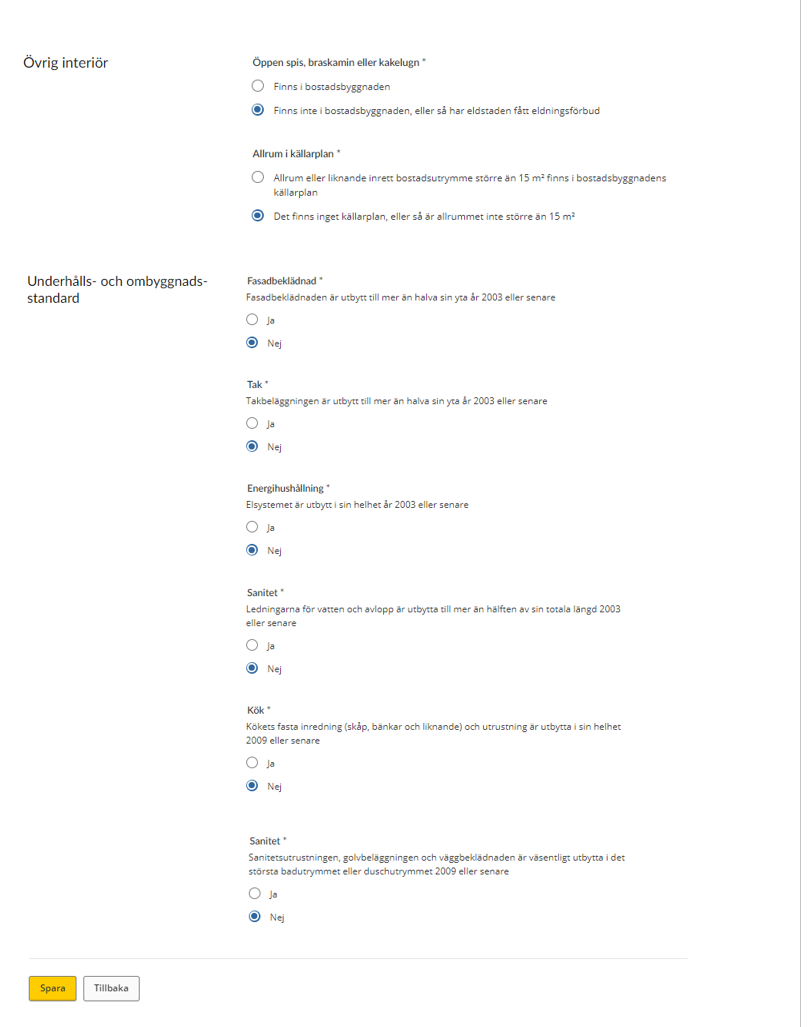
“Övrig interiör:” (Other interior features:)
- “Öppen spis, braskamin eller kakelugn*” (Fireplace, wood stove or tiled stove*)
- “Finns i bostadsbyggnaden” (Exist in the residential building)
- “Finns inte i bostadsbyggnaden, eller så har eldstaden fått eldningsförbud” (Do not exist in the residential building, or the existing fireplace has a lighting ban)
- “Allrum i källarplan”* (Basement recreation room*)
- “Allrum eller liknande inrett bostadsutrymme större än 15 kvadratmeter finns i bostadsbyggnadens källarplan” (The residential building’s basement has a recreation room or similar furnished living space with an area of more than 15 square metres)
- “Det finns inget källarplan, eller så är allrummet inte större än 15 kvadratmeter” (There is either no basement, or the recreation room has an area of less than 15 square metres)
“Underhålls- och ombyggnadsstandard”: (Maintenance and conversion standard):
- “Fasadbeklädnad”* (Facade covering)*
“Fasadbeklädnaden är utbygg till mer än halva sin yta år 2003 eller senare”
(The façade covering’s original surface area was expanded by more than half in 2003 or later)- “Ja” (Yes)
- “Nej” (No)
- “Tak”* (Roof)*
“Takbeläggningen är utbytt till mer än halva sin yta år 2003 eller senare”
(More than half of the roofing’s original surface area was replaced in 2003 or later)- “Ja” (Yes)
- “Nej” (No)
- “Energihushållning”* (Energy management)*
“Elsystemet är utbytt i sin helhet år 2003 eller senare”
(The whole electrical system was replaced in 2003 or later)- “Ja” (Yes)
- “Nej” (No)
- “Sanitet”* (Sanitation)*
“Ledningarna för vatten och avlopp är utbytta till mer än hälften av sin totala längd 2003 eller senare”
(More than half of the water and wastewater piping – in terms of its original length – was replaced in 2003 or later)- “Ja” (Yes)
- “Nej” (No)
- “Kök”* (Kitchen)*
“Kökets fasta inredning (skåp, bänkar och liknande) och utrustning är utbytta i sin helhet 2009 eller senare”
(The kitchen fittings (cabinets, countertops and similar) were replaced in their entirety in 2009 or later)- “Ja” (Yes)
- “Nej” (No)
- “Sanitet”* (“Sanitation)*
“Sanitetsutrustningen, golvbeläggningen och väggbeklädnaden är väsentligt utbytta i det största badrummet eller duschutrymmet 2009 eller senare”
(The sanitation equipment and floor and wall coverings in the biggest bath or shower room were mostly replaced in 2009 or later)- “Ja” (Yes)
- “Nej” (No)
Click on the button marked “Spara” (“Save”) to save the information. You will then be taken back to the overview page where all value units are listed. (See section 3.1.)
If you click on “Save” when a piece of information is missing, you will see an error message outlining what needs to be done before the information can be saved.
If you want to go back to the overview page without saving any information, click on the button marked “Tillbaka” (“Back”). (See section 3.1.)
3.2.8 Agricultural building under construction
If you opt to click on an agricultural building belonging to the property, or if you opt to add an agricultural building, you will be shown a form. All the information that the Swedish Tax Agency needs to know about your agricultural building is specified on this form.
At the top of the form, you have the option of removing an agricultural building. You do so by clicking on the wastebasket icon that says “Begär borttag ekonomibyggnad” (“Request removal of agricultural building”). (See section 3.5.)
On the rest of the form, you must/can provide information about the following:
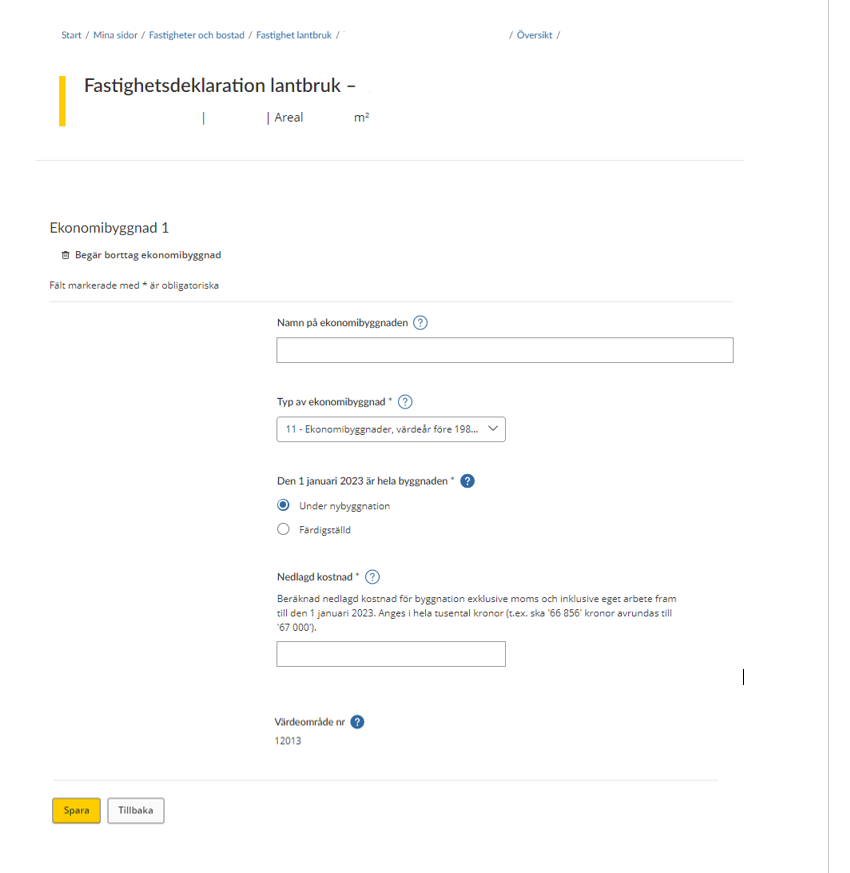
Agricultural building 1
The above form shows all the information that needs to be provided for a value unit that is an agricultural building.
At the top of the form, you have the option of removing an agricultural building. On the rest of the form, you must/can provide information about the following:
- “Namn på ekonomibyggnaden” (Name of the agricultural building) – If you want to, you can specify your own designation for your agricultural building.
- “Typ av ekonomibyggnad)”* (Type of agricultural building)* – Agricultural buildings are classified according to their intended use. You can select one of the following categories from a drop-down menu:
- 11 – Agricultural buildings, value year prior to 1980 (not building category
42, 44 and 51, 53) - 21 – Animal housing for dairy cows, value year 1980-
- 22 – Animal housing for beef cattle and young cattle, value year 1980-
- 23 – Animal housing for pigs, value year 1980-
- 24 – Animal housing for laying hens, value year 1980-
- 25 – Animal housing for sheep, goats and ostriches, value year 1980-
- 26 – Animal housing for horses, value year 1980-
- 27 – Animal housing for mink, foxes and similar, value year 1980-
- 28 – Animal housing for broiler chickens and turkeys, value year 1980-
- 31 – Shed, barn and similar, value year 1980-
- 32 – Machinery storage building, farm workshop and similar, value year 1980-
- 33 – Farm storehouse, etc., value year 1980-
- 34 – Indoor riding space
- 42 – Grain storage facility
- 44 – Silage silo
- 51 – Greenhouse, detached
- 52 – Greenhouse, multispan
- 53 – Basic greenhouse
- 60 – Other types of agricultural buildings
- 11 – Agricultural buildings, value year prior to 1980 (not building category
- “Den 1 januari 2023 (the year is just for example, each Property tax return states your correct year) är hela byggnaden” (On 1 January 2023 the entire building was)
- “Under nybyggnation” (Under construction)
- “Färdigställd” (Completed)
If you select “Under construction” above, you will be asked to enter the following details:
- “Nedlagd kostnad”* (Accrued expenses)* – State the total estimated construction cost.
“Beräknad nedlagd kostnad för byggnation exklusive moms och inklusive eget arbete fram till den 1 januari the year of assessment. Anges i hela tusental kronor (t.ex. ska ’66 856’ kronor avrundas till ’67 000’).”
(Estimated accrued construction expenditure, excluding VAT and including your own work, until 1 January 2023, rounded to the nearest SEK thousand (e.g. “SEK 66,856” should be rounded up to “SEK 67,000”).) - “Värdeområde nr” (Asset area no.) – The asset area number will be shown if it has been determined.
3.2.9 Completed agricultural building
If you opt to click on an agricultural building belonging to the property, or if you opt to add an agricultural building, you will be shown a form. All the information that the Swedish Tax Agency needs to know about your agricultural building is specified on this form.
At the top of the form, you have the option of removing an agricultural building. You do so by clicking on the wastebasket icon that says “Begär borttag ekonomibyggnad” (“Request removal of agricultural building”). (See section 3.5.)
On the rest of the form you must/can provide information about the following:
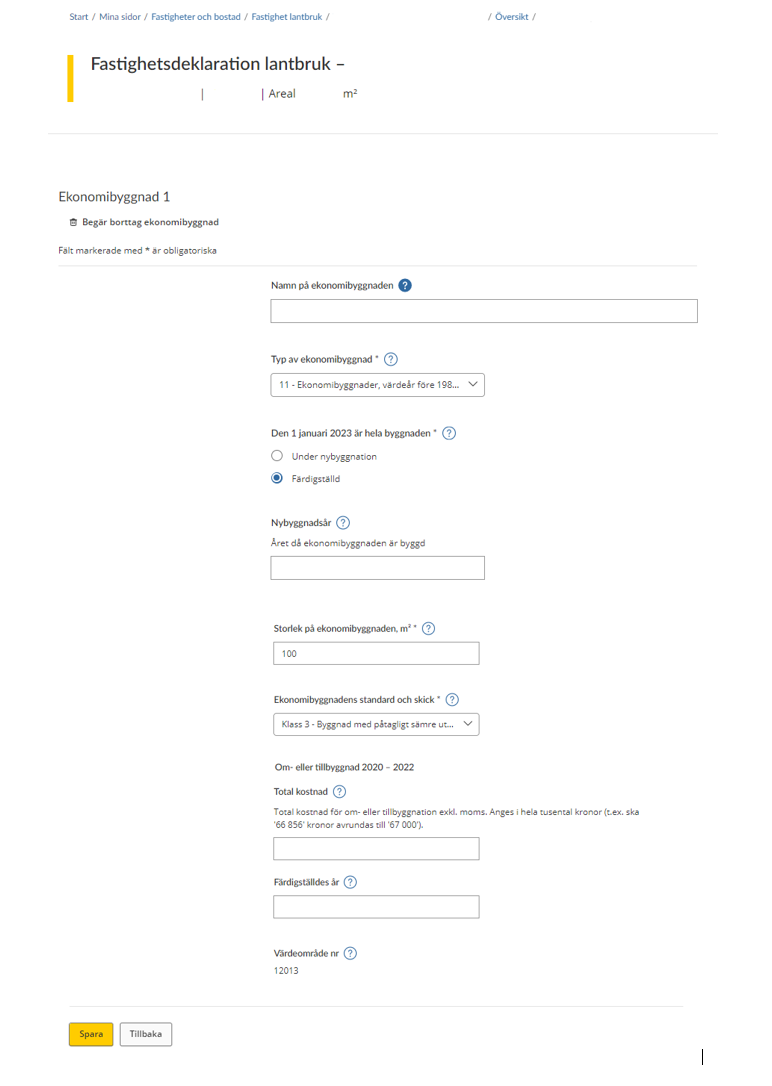
Agricultural building 1
The above form shows all the information that needs to be provided for a value unit that is an agricultural building.
At the top of the form, you have the option of removing an agricultural building.
On the rest of the form you must/can provide information about the following:
- “Namn på ekonomibyggnaden” (Name of the agricultural building) – If you want to, you can specify your own designation for your agricultural building.
- “Typ av ekonomibyggnad”* (Type of agricultural building)* – Agricultural buildings are classified according to their intended use. You can select one of the following categories from a drop-down menu:
- 11 – Agricultural buildings, value year prior to 1980 (not building category
- 42, 44 and 51,53)
- 21 – Animal housing for dairy cows, value year 1980-
- 22 – Animal housing for beef cattle and young cattle, value year 1980-
- 23 – Animal housing for pigs, value year 1980-
- 24 – Animal housing for laying hens, value year 1980-
- 25 – Animal housing for sheep, goats and ostriches, value year 1980-
- 26 – Animal housing for horses, value year 1980-
- 27 – Animal housing for mink, foxes and similar, value year 1980-
- 28 – Animal housing for broiler chickens and turkeys, value year 1980-
- 31 – Shed, barn and similar, value year 1980-
- 32 – Machin ry storage building, farm workshop and similar, value year 1980-
- 33 – Farm storehouse, etc, value year 1980-
- 34 – Indoor riding space
- 42 – Grain storage facility
- 44 – Silage silo
- 51 – Greenhouse, detached
- 52 – Greenhouse, multispan
- 53 – Basic greenhouse
- 60 – Other types of agricultural buildings
- “Den 1 januari 2023 (the year is just for example, each Property tax return states your correct year) är hela byggnaden”* (On 1 January 2023 the entire building was)*
- “Under nybyggnation” (Under construction)
- “Färdigställd” (Completed)
If you select “Under construction” above, you will be asked to enter the following details:
- “Nybyggnadsår” (Year of construction) – The year in which most of the agricultural building could be used.
“Året då ekonomibyggnaden är byggd” (The year in which the agricultural building was built) - “Storlek på ekonomibyggnaden, m²*” (Size of the agricultural building, m²*) – State the area of the agricultural building in square metres.
- “Ekonomibyggnadens standard och skick*” (Standard and condition of the agricultural building*) Select one of the following from the drop-down menu:
- “Klass 1” (Class 1) – Building of substantially better design and condition than what is normal for older buildings.
- “Klass 2” (Class 2) – Building of acceptable design and condition for older buildings.
- “Klass 3” (Class 3) – Building of substantially worse design and condition than what is normal for older buildings.
“Om- eller tillbyggnad” (Conversion or extension)
- “Total kostnad” (Total cost) – Fill in the costs you have incurred for your conversion or extension.
“Total kostnad för om- eller tillbyggnation exkl. moms. Anges i hela tusental kronor (t.ex. ska ’66 856’ kronor avrundas till ’67 000’).”
(Total cost of conversion or extension, excluding VAT and rounded to the nearest SEK thousand (e.g. “SEK 66,856” should be rounded up to “SEK 67,000”).) - “Färdigställdes år” (Year of completion) – Fill in the year in which the conversion or extension was ready for use.
- “Värdeområde nr.” (Asset area no.) – The asset area number will be shown if it has been determined.
3.3 Add building or plot of land
If the list does not include all value units, you can add a value unit yourself by clicking on the button marked “Lägg till Byggnad eller mark” (“Add building or plot of land”).
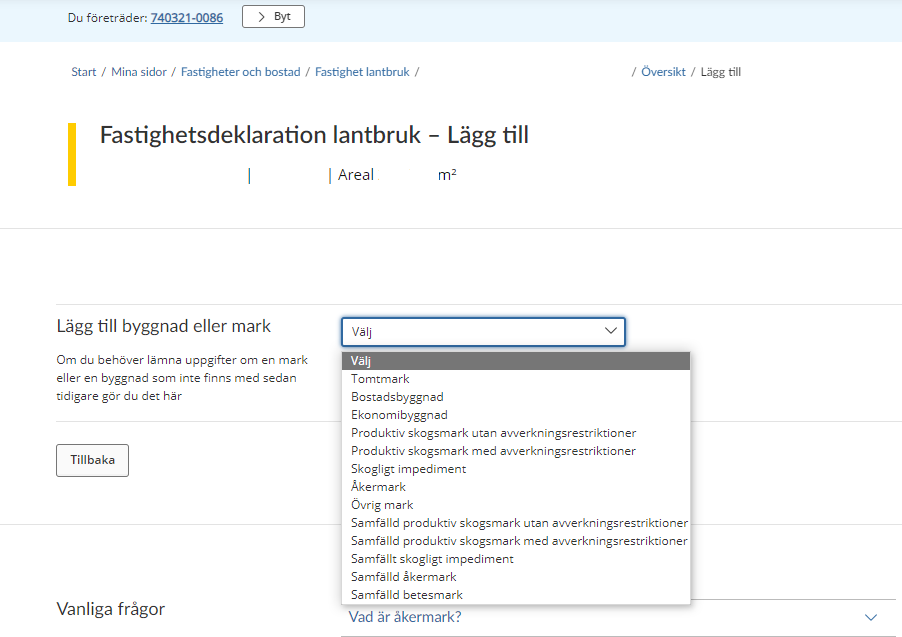
You will then be shown a drop-down menu where you select the type of land or a building you want to add. Once you have selected a value unit, you will be taken to the relevant form. (See sections 3.2.1-3.2.9.)
If you change your mind and decide not to add another value unit, click the button marked “Tillbaka” (“Back”) to be taken back to the overview page where all value units are listed. (See section 3.1.)
3.4 Information missing on value unit for taxation
If you need to add some information on a particular value unit for taxation, this will be shown in the overview. You will see a message in red saying “Åtgärd krävs” (“Action required”) by the value unit in question.
You then have to click on the value unit in question in order to add the missing details before you can sign and submit the information. (See sections 3.2.1-3.2.9 on the form for an outline of the details that need to be added.)
3.5 Remove a building or plot of land
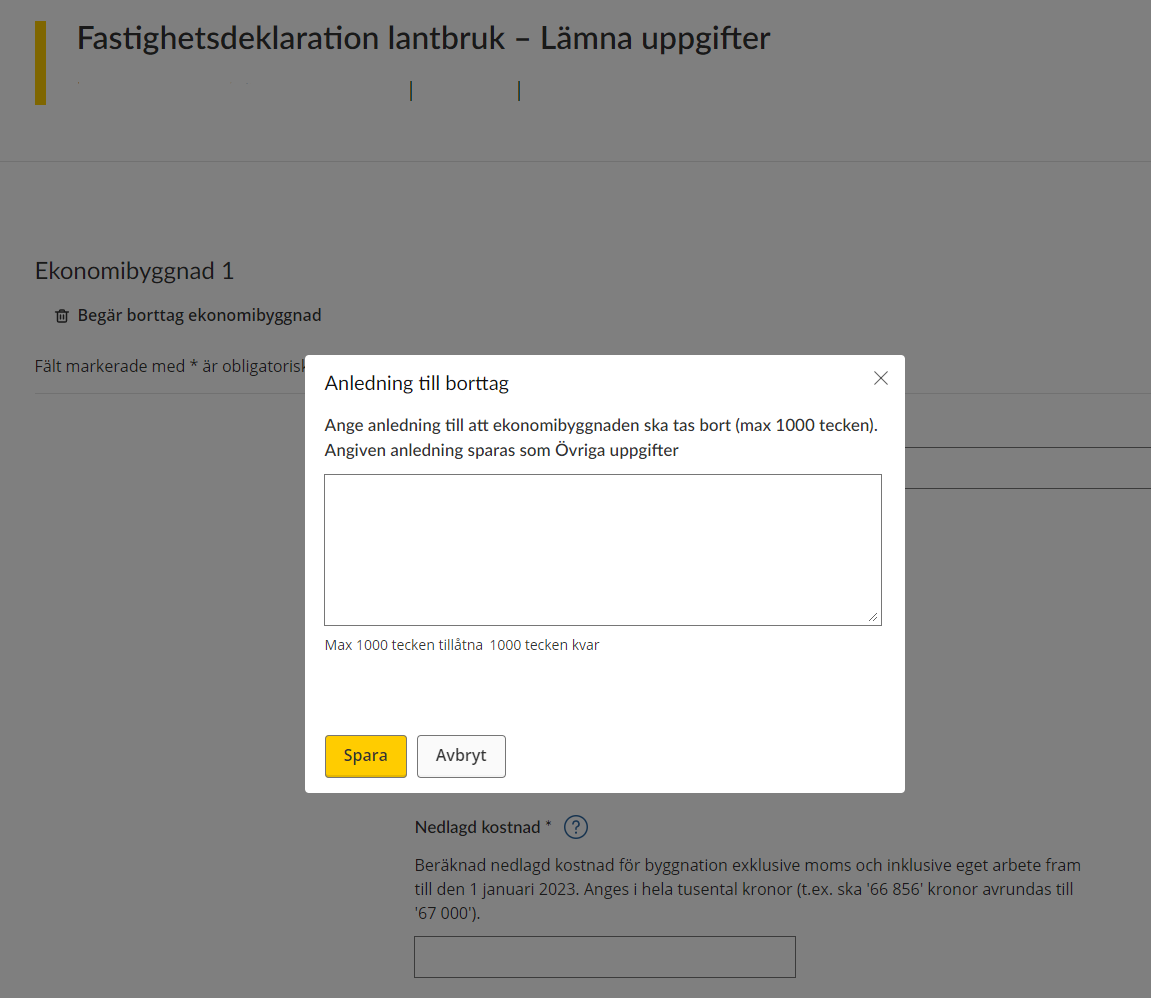
When you have the form for a particular building or plot open, you can opt to remove a value unit by clicking on the wastebasket icon saying “Begär borttag av x” (“Request removal of X”) (in the example below, the icon is marked “Begär borttag ekonomibyggnad” (“Request removal of agricultural building”).
If you opt to remove a value unit, you will be asked to provide a reason for this. You can enter a maximum of 1,000 characters.
Click on the button marked “Spara” (“Save”) to save the text you have entered, then you will be taken back to the overview page where all value units are listed. (See section 3.1.)
If you don’t want to provide a reason for your removal of the agricultural building, click on the button marked “Avbryt” (“Cancel”).
3.6 Other information
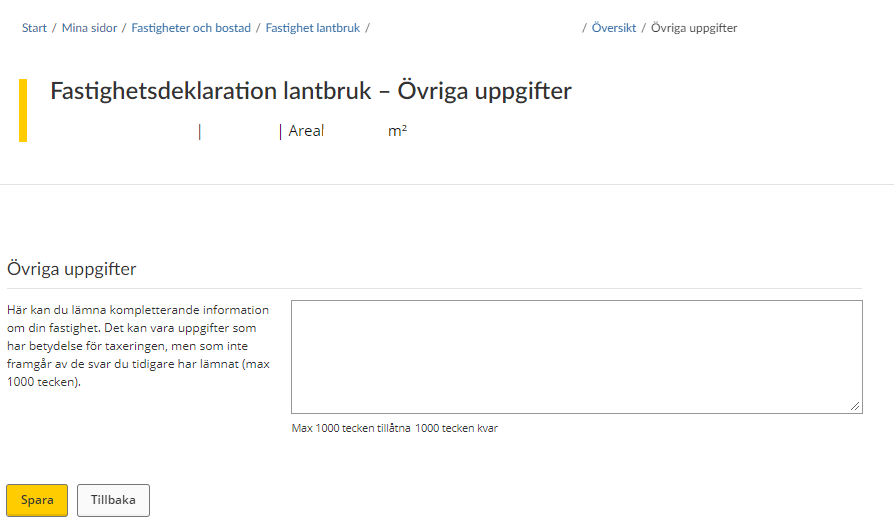
If you have opted to provide other information, you will be taken to a text box where you can enter additional details about your property. The information you provide can be a maximum of 1,000 characters in length.
Click on the button marked “Spara” (“Save”) to save the text you have entered, then you will be taken back to the overview page where all value units are listed. (See section 3.1)
If you change your mind about providing other information, click on the button marked “Avbryt” (“Cancel”) and you will be taken back to the overview page where all value units are listed. (See section 3.1.)
3.7 Notification of ownership change
If the property was sold before 1 January the year of assessment, you do not have to provide any information about it.
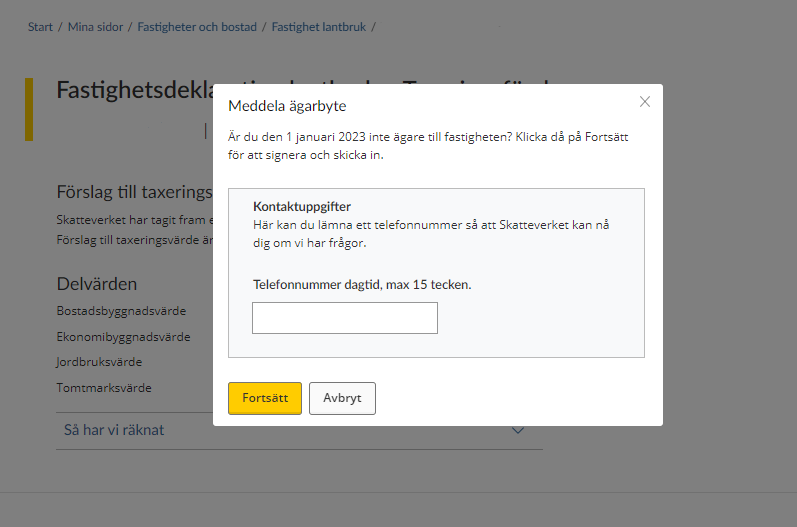
You need to notify the Swedish Tax Agency of the change of ownership instead. You do this by clicking on the button marked “Meddela ägarbyte” (“Submit change of ownership notification”).
When you have on the button marked “Meddela ägarbyte” (“Submit change of ownership notification”), you will be asked to provide your phone number so that the Swedish Tax Agency can contact you if necessary. The phone number you provide can comprise a maximum of 15 characters.
Once you have provided your phone number and want to proceed, click on the button marked “Spara” (“Save”). You will then move on to a signing procedure during which you have to approve the information you have provided using your eID.
If you change your mind about submitting a change of ownership notification, click on the button marked “Avbryt” (“Cancel”).
4 Sign and submit your tax return
Once you have provided all the information about your property and want to submit it to the Swedish Tax Agency, click on the button marked “Signera och skicka in” (“Sign and submit”).
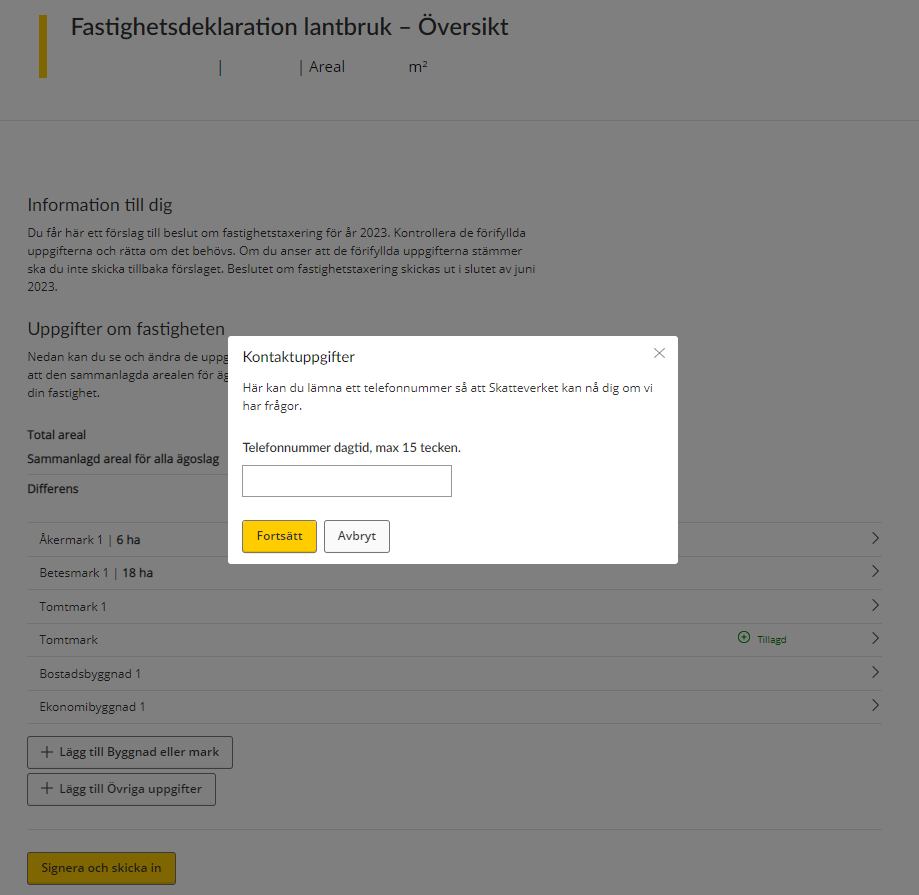
Once you have approved the information and submitted your tax return, we will provide you with a receipt confirming the details you have submitted via our e-service.
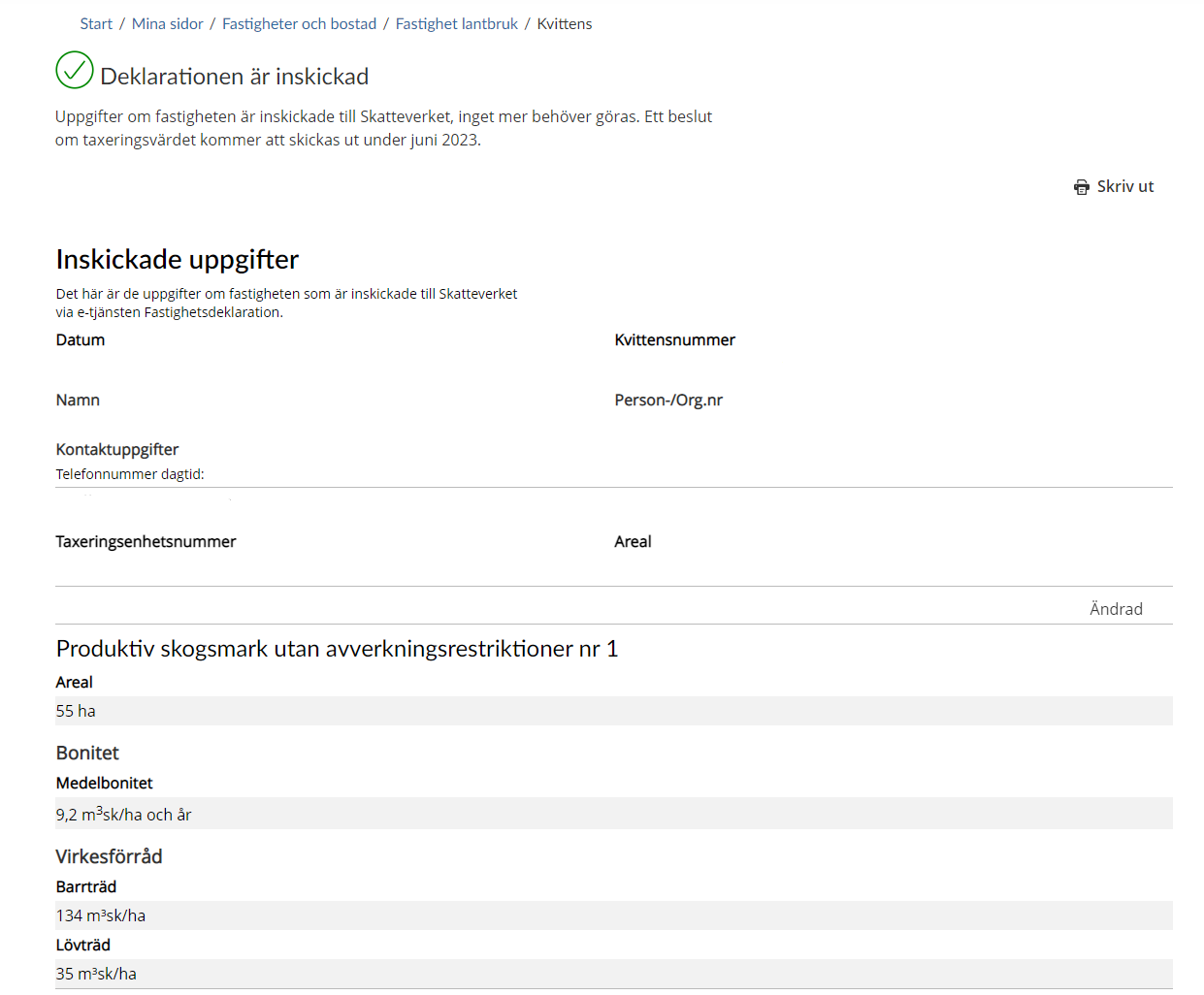
The receipt will include the following:
- receipt number – a unique number ensuring that the information you have provided can be traced at the Swedish Tax Agency
- personal/corporate identity number – the personal or corporate identity number of the party that submitted the information
- contact details – the phone number you have stated that the Swedish Tax Agency can use to reach you if necessary.
- NUNNÄS 2:5 – the property designation of the property that the tax return concerns.
- Tax assessment unit number of the property for which the tax return has been filed.
- Area – the size in square metres of the property for which the tax return has been filed.
“Produktiv skogsmark utan avverkningsrestriktioner nr 1” (Productive forest land without felling restrictions no. 1)
- “Areal” (Area) – This shows the total area in hectares.
- “Bonitet” (Site quality) – This shows the site’s timber-producing capacity and must be specified in forest cubic metres per hectare and year.
- “Virkesförråd” (Standing volume) – This shows the proportion of softwood and hardwood comprising the standing volume.
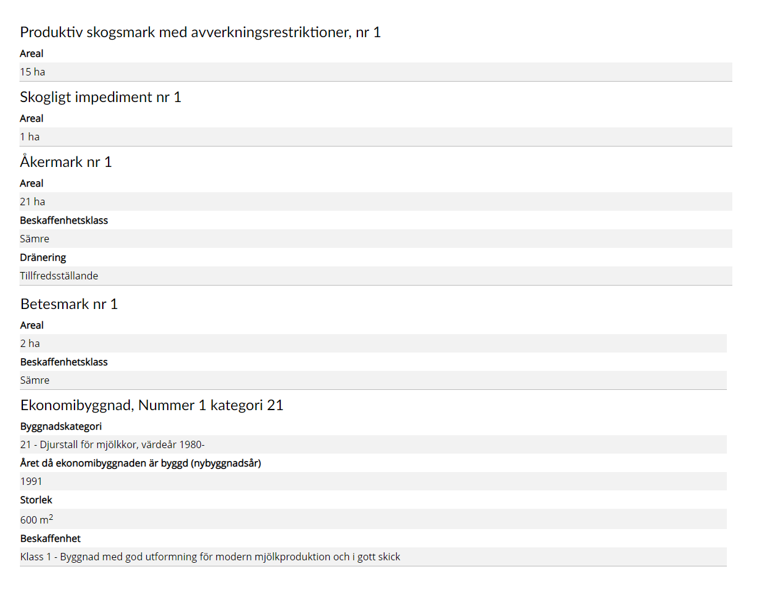
“Produktiv skogsmark med avverkningsrestriktioner nr 1” (Productive forest land with felling restrictions no. 1)
- “Areal” (Area) – This shows the total area in hectares.
“Skogligt impediment nr 1” (Unproductive forest land no. 1)
- “Areal” (Area) – This shows the total area in hectares.
“Åkermark nr 1” (Arable land no. 1)
- “Areal” (Area) – This shows the total area in hectares.
- “Beskaffenhetsklass” (Quality class – This shows the land productivity and cultivation conditions.
- “Dränering” (Drainage) – This shows whether or not the drainage is satisfactory.
“Betesmark nr 1” (Pasture land no. 1)
- “Areal” (Area) – This shows the total area expressed in hectares.
- “Beskaffenhetsklass” (Quality class) – This shows the land productivity and cultivation and drainage conditions in relation to the average conditions in your asset area.
“Ekonomibyggnad, Nummer 1 kategori 21” (Agricultural building, Number 1 category 21
- “Byggnadskategori” (Building category) – This shows the intended use of the agricultural building.
- “Året då ekonomibyggnaden är byggd (nybyggnadsår)” (The year in which the agricultural building was constructed (year of construction).
- “Storlek” (Size) – This shows the size of the agricultural building.
- “Beskaffenhet” (Quality) – This shows the standard and condition of the agricultural building.