


How to use our e-service Application for Growth Support
This is a guide on how to use the e-service Application for Growth Support.
Log in to the e-service
Use our e-service Application for Growth Support (in Swedish: Ansökan om växa-stöd)
How to log in to the e-service
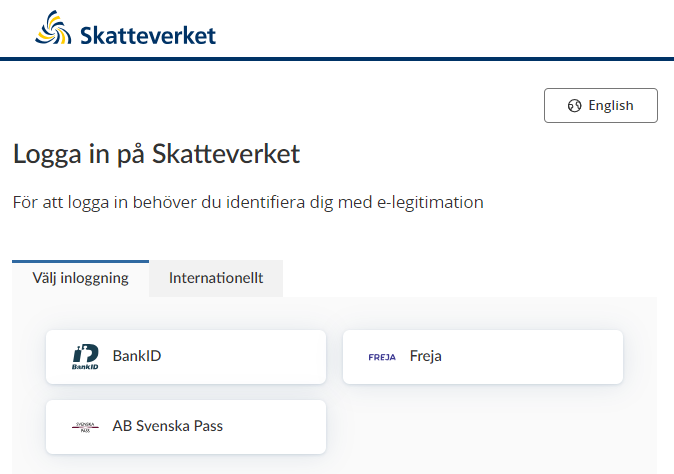
When you click on the link to the e-service, a login page opens. Select your chosen form of Swedish eID, then identify yourself. (The e-service does not currently support foreign eID.)
Select the business you wish to represent
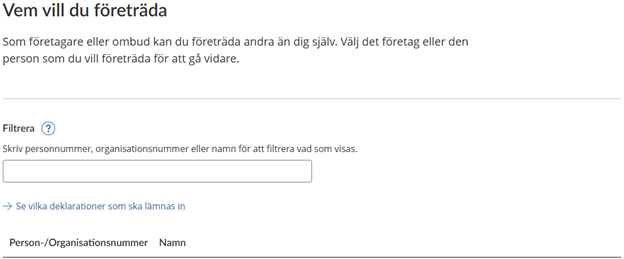
If you’re an authorised business representative, you must select the party you wish to represent for the current session.
Select a business or individual from the list or type the name of the relevant party in the search field.
If you haven’t applied to represent a business, you’ll be taken directly to the e-service.
The e-service start page
On the start page, you can choose between various options to start the application process. Here you can also find information relating to any previous applications you’ve made.
Saved details
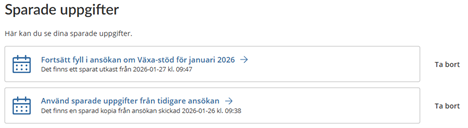
Under the heading “Sparade uppgifter” (“Saved details”), either one or two options will be available, depending on whether you have saved a draft or details relating to a previously submitted application. If you have not saved any details, this section will be empty.
“Utkast” (“Drafts”) are applications you have started for specific periods. You can save one or more drafts in the e-service, but only one for each period. Select a draft to continue with an application you have started for a particular reporting period.
If available, the option “Sparade uppgifter från tidigare ansökan” (“Saved details from last application submitted”) shows saved details from your most recently submitted application.
To continue with an application, click on the draft corresponding to the reporting period for which you want to apply for Growth Support:
“Fortsätt fyll i ansökan om Växa-stöd för [månad år]” (“Continue with your Growth Support application for [month year]”) “Det finns ett sparat utkast från [datum och tid]” (“A saved draft is available from [date and time]”)
To start a new application with prefilled details from your most recently submitted application, click:
“Använd sparade uppgifter från tidigare ansökan” (“Use details saved from previous application”)
“Det finns en sparad kopia från ansökan skickad [datum och tid]” (“A saved copy of the application submitted on [date and time] is available”)
Click on “Ta bort” (“Delete”) in the relevant row to delete a draft or saved details.
Applying for Growth Support
You can start making a completely new application if you like, or if no saved details are available.
To do this, click on “Ansök om växa-stöd” (“Apply for Growth Support”).

Previous applications
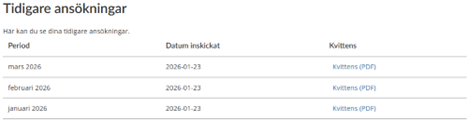
If the business has applied for Growth Support before, you can view the associated details under “Tidigare ansökningar” (“Previous applications”). The information in the table includes the reporting period to which the application relates, the submission date, and a download link for each application receipt. Click “Kvittens (PDF)” (“Receipt (PDF)”) to download the relevant application receipt.
Filling in your application
General information about filling in your application
- Not all e-service users can view every field. The fields shown are determined by the business type and application details provided previously. This guide covers every field that can be displayed in an application.
- All fields displayed are mandatory, apart from “Telefonummer” (“Telephone number”) in step 7, “Kontaktuppgifter för denna ansökan” (“Contact details for this application”).
- For certain fields, you can view a help text by clicking on the question mark icon. These help texts are in Swedish only and are not included in this guide.
- Information texts may also be displayed, depending on your response to certain questions. These explain the implications of your responses. These texts are not translated in this guide. There are two types of information texts:
- Blue information box: These texts only provide explanatory information about the current question, and the implications of your intended response.
- Orange information box: This is a warning that details will be deleted (if you choose not to save them for future applications), or that the business does not fulfil the Growth Support requirements. However, you can choose to proceed with submitting this application despite this warning.
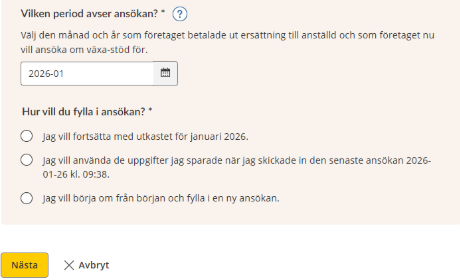
Preliminary step: Selecting a reporting period
Here you choose the reporting period to which the application relates.
- Select “år och månad” (“year and month”) in the field marked “Vilken period avser ansökan?” (“Which period does the application relate to?”)
Choose the year and month for which the business paid employee compensation and now wants to apply for Growth Support.
If no draft is available for the selected period, and no details have been saved from a previously submitted application, there are no further choices for you to make.
If a draft is available for the selected period and/or saved details from a previously submitted application, you will be asked to choose between either two or three options (depending on which details have been saved).
Choose one of the following options:
- “Jag vill fortsätta med utkastet för [datum och tid]” (“I want to continue with the draft from [date and time]”.
- “Jag vill använda de uppgifter jag sparade när jag skickade in den senaste ansökan [datum och tid]” (“I want to use the details saved from my most recently submitted application [date and time]”).
- “Jag vill börja om från början och fylla i en ny ansökan” (“I want to start again and create a new application”). (If you choose this option, an orange box appears, warning you that saved details from a previously submitted application, and any draft for the selected period, will be deleted.)
Click “Nästa” (“Next”) to proceed.
or:
Click “Avbryt” (“Cancel”) if you do not wish to save any details.
Step 1: Details of the business’s operations
Provide details of the business here.
- Answer “31 december 2023 eller tidigare” (“31 December 2023 or earlier”) or “1 januari 2024 eller senare” (“1 January 2024 or later”) in the field “När startade företaget sin verksamhet?” (“When did the business begin its operations?”).
- Answer “Motsvarande svenskt AB” (“Equivalent to Swedish limited company”), “Motsvarande svenskt HB” (“Equivalent to Swedish partnership”) or “Annan företagsform” (“Other type of business”) in the field “I vilken företagsform driver företaget verksamhet?” (“Under which type of business structure does the business operate?”). (Displayed for non-Swedish businesses only)
- Start typing in the field marked “Inom vilket verksamhetsområde driver företaget verksamhet?” (“In which industry sector does the business operate?”) to search for or select an EU NACE code (SNI code).
- Answer “Ja” or “Nej” (“Yes” or “No”) to the question “Är företaget till någon del verksamt inom primärproduktion av jordbruksprodukter?” (“Is the business active to any extent in the primary production of agricultural products?”).
- Answer “Ja” or “Nej” (“Yes” or “No”) to the question “Är företaget till någon del verksamt inom fiskeri-och vattenbrukssektorn?” (“Is the business active to any extent in the fisheries and aquaculture sector?”).
Click “Nästa” (“Next”) to proceed and save the details you have entered as a draft.
or
Click “Avbryt” (“Cancel”) if you do not wish to save any details.
Step 2: Business structure
Here you answer questions about the business’s structure.
- Answer “Ja” or “Nej” (“Yes” or “No”) to the question “Är företaget, eller har det tidigare varit, i intressegemenskap med ett eller flera andra företag?” (“Is the business – or has it previously been – part of an associate enterprise?”).
- Answer “Ja” or “Nej” (“Yes” or “No”) to the question “Ingår företaget idag i en enhet med andra företag?” (“Is the company currently part of a group that includes other businesses?”).
- If you answered “Ja” (“Yes”), enter details of all business that are part of this group. Enter the details of one business at a time by clicking “Lägg till företag” (“Add business”), and answer the following questions:
- Answer “Ja” or “Nej” (“Yes” or “No”) to the question “Har företaget ett svenskt identitetsnummer” (“Does the business have a Swedish corporate identity number?”).
- If you answered “Ja” (“Yes”):
- Enter a Swedish corporate identity number in the field marked “Svenskt identitetsnummer” (“Swedish corporate identity number”).
- If you answered “Nej” (“No”):
- Enter a foreign corporate identity number in the field “Utländskt identitetsnummer” (“Non-Swedish corporate identity number”)
- Select a country code in the field marked “Landskod (TIN)” (“Country code (TIN)”).
- Enter the name of the business in the field marked “Företagets namn” (“Name of business”).
Click “Nästa” (“Next”) to proceed and save the details you have entered as a draft.
or:
Click “Avbryt” (“Cancel”) if you do not wish to save any details.
Step 3: Employees included in the application for Growth Support
Here you answer questions about the employees included in this Growth Support application.
- State the number of employees included in response to the question “Hur många anställda avser ansökan?” (“How many employees are included in this application?”).
You will then answer some questions about each employee.
- Answer “Ja” or “Nej” (“Yes” or “No”) to the question “Har den anställda ett svenskt person- eller samordningsnummer?” (“Does the employee have a Swedish personal identity number or coordination number?”).
- If you answered “Ja” (“Yes”):
- Enter the personal identity or coordination number in the field “Person- eller samordningsnummer” (“Personal identity number or coordination number”).
- If you answered “Nej” (“No”):
- Enter a non-Swedish Tax Identification Number or the equivalent in the field marked “Identitetsnummer (TIN-nr)” (“Identification number (TIN)”
- Select a country code in the field marked “Landskod (TIN)” (“Country code (TIN)”).
- Enter the employee’s name in the field marked “Namn” (“Name”).
- Select their date of birth in the field marked “Födelsedatum” (“Date of birth”).
- Enter their place of birth in the field marked “Födelseort” (“Place of birth”).
- Select the country code in the field marked “Medborgarskap” (“Citizenship”).
When you’ve entered the employee’s identification details, you must answer some mandatory questions regardless of identification number type.
- Answer “Ja” or “Nej” (“Yes” or “No”) to the question “Finns det ett anställningsavtal mellan den anställda och företaget som gäller en anställning på minst tre månader i följd och en arbetstid på minst 20 timmar per vecka?” (“Is an employment contract in place between the employee and the business, specifying an employment period of at least three consecutive months and a minimum of 20 hours per week?”).
- Select a date in the field marked “När gav företaget ut ersättning för utfört arbete till den anställda första gången?” (“When did the business make its first compensation payment to the employee for work carried out?”)
- Enter a compensation amount in the field marked “Hur stor ersättning fick den anställda under [månad år]?” (“How much compensation did the employee receive during [month year]?”).
- Answer “Ja” or “Nej” (“Yes” or “No”) to the following questions:
- “Har företaget fyllt i ruta 302 eller 303 i arbetsgivardeklarationen för redovisningsperioden [månad år]?” (“Was box 302 or 303 filled in for the business in its PAYE return for the reporting period [month year]?”)
- “Har företaget fyllt i ruta 305 i arbetsgivardeklarationen för redovisningsperioden [månad år]?” (“Was box 305 filled in for the business in its PAYE return for the reporting period [month year]?”)
- “Har den anställda varit delägare i företaget någon gång under perioden [1 januari 3 år innan datum för första ersättning till den anställda] – [datum för första ersättning till den anställda]?” (“Was the employee a part-owner of the business at any time during the period from [1 January three years before the date of the first employee compensation payment] to [date of first employee compensation payment]?”)
- “Har den anställda varit företagsledare i företaget någon gång under perioden [1 januari 3 år innan datum för första ersättning till den anställda] – [datum för första ersättning till den anställda]?” (“Was the employee a director of the business at any time during the period from [1 January three years before the date of the first employee compensation payment] to [date of the first employee compensation payment]?”)
- “Var den anställda den [datum för första ersättning till den anställda] närstående till någon person som är eller har varit delägare eller företagsledare i företaget någon gång under perioden [1 januari 3 år innan datum för första ersättning till den anställda] – [datum för första ersättning till den anställda]?” (“On [date of the first employee compensation payment], was the employee related to someone who is or has been a part-owner or director of the business at any time during the period from [1 January three years before the date of the first employee compensation payment] to [date of the first employee compensation payment]?”)
- “Har den anställda någon gång under perioden [1 januari 3 år innan datum för första ersättning till den anställda] – [datum för första ersättning till den anställda] varit anställd i ett annat företag som, direkt eller indirekt, drivs eller har drivits av någon som den [datum för första ersättning till den anställda] var närstående till en person som direkt eller indirekt äger del i företaget?” (“Was the employee, at any time during the period [1 January three years before the date of first remuneration to the employee] to [date of the first compensation payment to the employee], employed by another business that, directly or indirectly, is or has been run by someone to whom the employee was related on [date of the first compensation payment to the employee], and who directly or indirectly owns a share in the business?”)
- Answer 1, 2 or “Fler än 2” (“More than 2”) in response to the question “Hur många delägare fanns det i företaget den [datum för första ersättning till den anställda]?” (“How many part-owners did the business have on [date of first compensation payment to the employee]?”)
- Answer “Ja” or “Nej” (“Yes” or “No”) to the question “Drev företaget rörelse den [datum för första ersättning till den anställda]?” (“Was the business operating on [date of the first compensation payment to the employee]?)”
- Answer “Ja” or “Nej” (“Yes” or “No”) to the question “Har företaget haft andra anställda någon gång under perioden [företagets starttidpunkt] - [datum för första ersättning till den anställda]?” (“Did the business have other employees at any time during the period from [business start date] to [date of the first compensation payment to the employee]?”)
- If you answered “Ja” (“Yes”) to the question above, you must also provide the details required in response to the following:
- Answer “Ja” or “Nej” (“Yes” or “No”) to the question “Har någon av dessa anställda fått ersättning som överstiger 5 000 kr under perioden [företagets starttidpunkt] - [datum för första ersättning till den anställda]?” (“Did any of these employees receive compensation exceeding SEK 5,000 during the period from [business start date] to [date of the first compensation payment to the employee]?”)
- Answer 1, 2 or “Fler än 2” (“More than 2”) in response to the question “Hur många anställda gav företaget ut sådan ersättning till?” (“How many employees received such compensation?”)
- Answer 1, 2 or “Ingen” (“None”) in response to the question “Hur många av dessa anställda äger direkt eller indirekt andelar i företaget eller är närstående till en sådan ägare?” (“How many of these employees directly or indirectly own a share in the business or are related to one of its owners?”)
- Answer “Ja” or “Nej” (“Yes” or “No”) to the question “Var denna anställda fortfarande anställd i företaget [datum för första ersättning till den anställda]?” (“Was this employee still employed by the business on [date of the first compensation payment to the employee]?”)
Click “Nästa” (“Next”) to proceed and save the details you have entered as a draft.
or:
Click “Avbryt” (“Cancel”) if you do not wish to save any details.
Step 4: Deductions claimed by the business in its PAYE return
Here you answer questions about the deductions the business has claimed.
- Answer “Ja” or “Nej” (“Yes” or “No”) to the question “Har företaget gjort avdrag för regionalt stöd i arbetsgivardeklarationen för redovisningsperiod [månad år]?” (“Did the business claim a deduction for Regional Support in its PAYE return for the reporting period [month year]?”)
- If you answered “Ja” (“Yes”):
- Enter an amount in the field marked “Hur stor del av avdraget är kopplat till de anställda som företaget ansöker om växa-stöd för?” (“What share of this deduction relates to the employees included in the business’s current Growth Support application?”). Enter “0” (zero) if the business claimed a deduction for Regional Support for the selected period but no share of this deduction relates to the employees included in the business’s current application for Growth Support.
- Answer “Ja” or “Nej” (“Yes” or “No”) to the question “Har företaget gjort avdrag för forskning och utveckling (FoU) i arbetsgivardeklarationen för redovisningsperiod [månad år]?” (“Did the business claim a deduction for research and development in its PAYE return for the reporting period [month year]?”)
- If you answered “Ja” (“Yes”):
- Enter an amount in the field marked “Hur stor del av avdraget är kopplat till anställda som företaget ansöker om växa-stöd för?” (“What share of this deduction relates to the employees included in the business’s current Growth Support application?”). Enter “0” (zero) if the business claimed a deduction for Regional Support for the selected period but no share of this deduction relates to the employees included in the business’s current application for Growth Support.
Click “Nästa” (“Next”) to proceed and save the details you have entered as a draft.
or:
Click “Avbryt” (“Cancel”) if you do not wish to save any details.
Step 5: Details of “de minimis” government support received
Here you answer questions about “de minimis” government support (subsidies of minor significance) that the company has received.
- Enter an amount in the field marked “Stöd av mindre betydelse” (“De minimis support”). Enter “0” (zero) if the business has not received de minimis government support.
Click “Nästa” (“Next”) to proceed and save the details you have entered as a draft.
or:
Click “Avbryt” (“Cancel”) if you do not wish to save any details.
Step 6: Growth Support amount
Here you state the Growth Support amount that the business is applying for.
First, you will see the following text: “Förutsatt att företaget uppfyller alla kriterier för växa-stöd kan företaget ansöka om växa-stöd med högst [belopp] kr. Beloppet har beräknats utifrån uppgifterna i ansökan.” (“Provided that all the criteria for Growth Support have been fulfilled, the business may apply for Growth Support amounting to a maximum of SEK [amount]. This amount has been calculated based on the application details provided.”)
Additional information is provided about the factors that can determine the Growth Support amount that the business can apply for.
- Enter the amount that you wish to apply for in the field marked “Fyll i hur stort växa-stöd företaget ansöker om.” (“Enter the amount of Growth Support that the business is applying for.”)
Click “Nästa” (“Next”) to proceed and save the details you have entered as a draft.
or:
Click “Avbryt” (“Cancel”) to cancel without saving any details.
Step 7: Contact details relating to this application
Here you enter the contact details relating to your current application. These details are optional.
- In the field marked “Telefonnummer” (“Telephone number”), please provide a telephone number for an authorised representative that the Swedish Tax Agency can contact regarding this Growth Support application.
Click “Nästa” (“Next”) to proceed and save the details you have entered as a draft.
or:
Click “Avbryt” (“Cancel”) to cancel without saving any details.
Step 8: Review the application details provided
Here you can review all the details you have entered to ensure that they are correct before submitting the application.
You can also choose to save the details for a future Growth Support application. You will be able to access the details you have saved on the e-service’s start page.
- Answer “Ja, spara uppgifterna” (“Yes, save the details”) or “Nej, spara inte uppgifterna” (“No, do not save the details”) in response to the question “Vill du spara uppgifterna till en kommande ansökan?” (“Do you want to save these details for a future application?”).
- To confirm the details you have provided, put an “x” in the box marked “Jag har granskat att uppgifterna i ansökan är riktiga och fullständiga” (“I have checked that the details in this application are correct and complete”).
Click “Skriv under och skicka in” (“Sign and submit”) to proceed and sign using your eID.
or:
Click “Avbryt” (“Cancel”) if you do not wish to save any details.
Step 9: Receipt
A receipt will be shown when you submit your application.
The receipt includes the following:
- confirmation that the Swedish Tax Agency has received the business’s application
- a receipt reference number
- details of the business that the application relates to, and who submitted the application
- period
- date
- an expandable section called “Uppgifter i ansökan” (“Details provided in the application”), which shows all the details you entered
- information about what happens next
To download the receipt as a pdf, click “Spara PDF” (“Save PDF”).
To print out the receipt, click “Skriv ut” (“Print”).
To return to the e-service start page, click “Till tjänstens startsida” (“Return to the e-service start page”).